
HermanSu
5 months agoMember
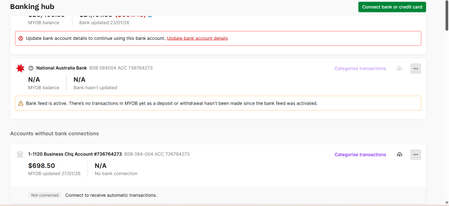
How to add a category to a back feed activated account
I just applied a second bank feed. And I can't find any icon to add a category requested as shown above. is there anything I can do to fix it? Thanks.
- 5 months ago
Hi HermanSu,
At the moment, there's nothing wrong on your end. When you've just applied for a second bank feed, the option to add or link a category won't show up straight away. That part only becomes available once the bank feed application is fully approved and the first transactions actually start coming through. If it's taking longer than expected though, your best bet is to reach out to our live chat support through our virtual assistant, MOCA, or submit a case via My Account. The team there can check the status of the feed and help move things along if needed.
Regards,
Sai


