Forum Discussion


Mike_James
3 years agoUltimate Cover User
Hi, sorry I meant the payment transaction and invoice. In both, can you open each transaction, so that you can see the actual screens that you recorded them on, and take a screenshot of both.
Use Snip to take the screenshot, in Windows search for snip by opening the Start menu and type Snip.

mayfield
3 years agoExperienced User
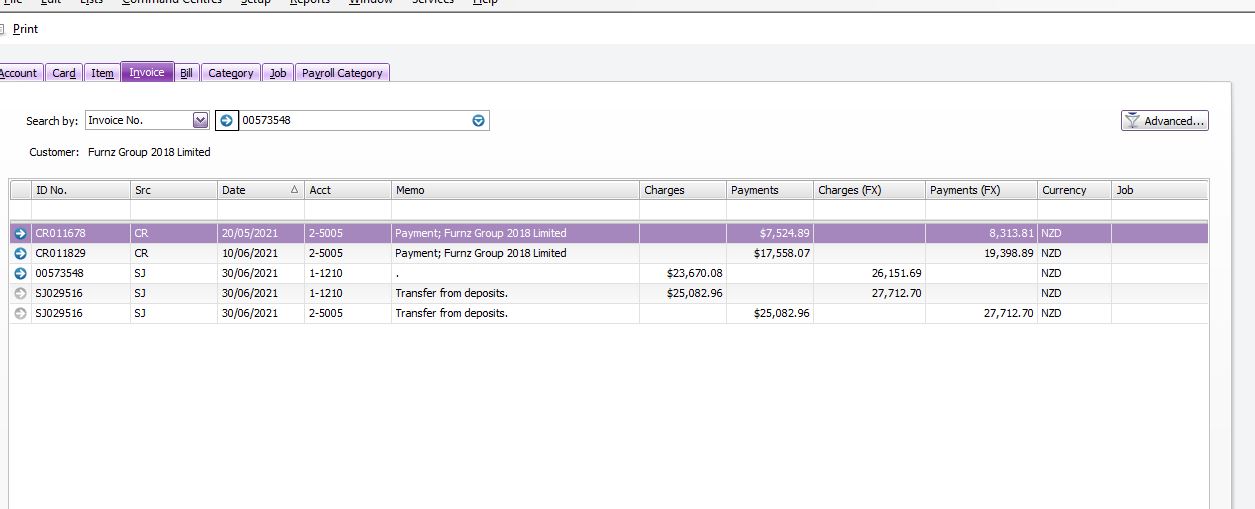
it won't let me send it again, but that is the screen i get when i click into the "applied to date" "history" button
- Mike_James3 years agoUltimate Cover User
Thank you, so from the history screen, can you click the blue arrow on the first 3 lines, and take a snip of those 3 screens (the data entry screens) and post those?
I suspect the issue is around the FX and exchange rates.
Looking for something else?
Search the Community Forum for answers or find your topic and get the conversation started!
Dig into MYOB Academy for free courses, learning paths and live events to help build your business with MYOB.