Forum Discussion

Mic2's avatar
Mic2
Contributing User
2 years ago

Customer statement reporting incorrect aging totals

Our customer statements are not reporting correct total for some of our customers.


We send out customer statements at the start of overy month. At the bottom of our statements we have totals showing 30 days, 60 days, 90 days, current and grand total.


We have been using the same statement form for years. For the last 6 months or so, some of our customers have reported that when they receive their statement that the 30 days, 60 days etc. totals are not populating and that its all just lumped together in 'Current'.

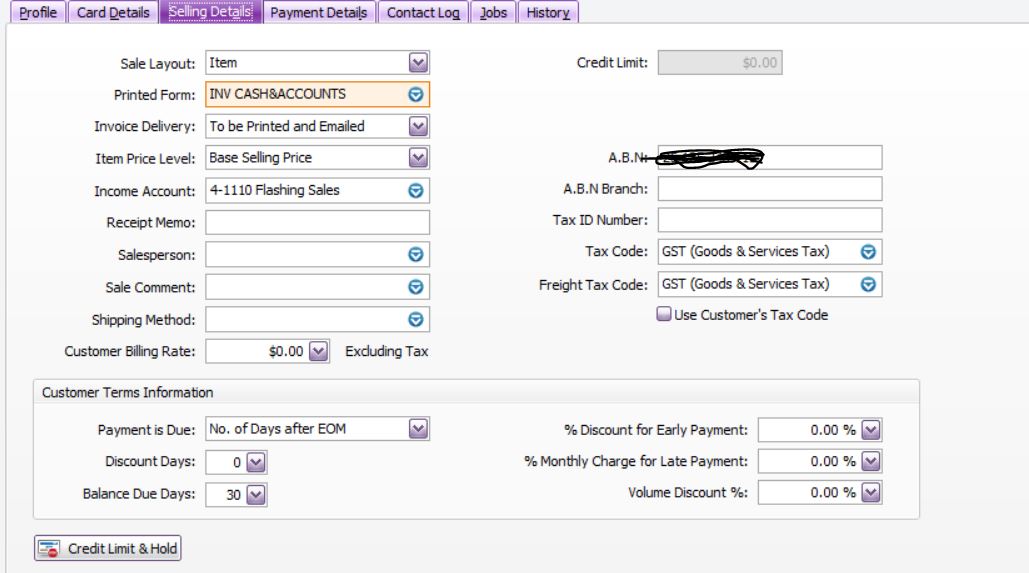
All of our cutomers are set up as 30 days from EOM on their card and our setting are set up to "Use Monthly Ageing periods"

Ive checked our statement form and it all looks correct as it shows "Period 1, Period 2, Period 3.


I will upload screen shots of our current settings and a customer statement showing invoices from different months and how the totals do not display correctly.

I have spoken to MYOB on the phone and they couldnt figure out why.

Has anyone had this problem? 

Any suggestions?


16 Replies

  • Lee_D's avatar
    Lee_D
    Cover User
    1 year ago

    This seems to be an ongoing issue without any resolution!!

    I am having the same with my statements, I changed the ageing in preferences and on the invoices, and waited a month or so to see if it resolved itself, still happening!!

  • officeatwab's avatar
    officeatwab
    Experienced User
    9 months ago

    Has anyone resolved this??? came on here to check for other people with the same issue.  Used to work correctly here and now it hasnt for the last 4 months or so - any solution yet???

  • officeatwab's avatar
    officeatwab
    Experienced User
    9 months ago

    Has anyone resolved this??? came on here to check for other people with the same issue.  Used to work correctly here and now it hasnt for the last 4 months or so - any solution yet???

  • Genreve_S's avatar
    Genreve_S
    MYOB Moderator
    9 months ago

    Hi everyone, 


    If you’ve already double-checked all the invoice due dates and the statements still don’t match up, it’s best to give our team a shout so we can dig into it further. You can either pop in a support ticket through the MyAccount window or chat with our live support team via our virtual assistant MOCA.


    Regards,
    Genreve

  • GAD000's avatar
    GAD000
    Contributing User
    1 month ago

    Has anyone had a solution on this? I have recently noticed the ageing totals not calculating. I really need to get this sorted asap! I have checked all settings and they are correct.


    Any help is appreciated, thanks!


  • Doreen_P's avatar
    Doreen_P
    MYOB Moderator
    1 month ago

    Hi GAD000,


    Not ideal when you’ve already gone through your ageing setup, checked all the settings and it still won’t calculate the totals. If everything there looks right but the ageing figures still won’t update, there’s likely something happening in the background that you won’t be able to fix from your side. The best move is to reach out to our team so they can check what seems to be going on. You can contact them on Live Chat via our virtual assistant, MOCA, or by submitting a support case via My Account.


    Cheers,

    Doreen

Looking for something else?

Search the Community Forum for answers or find your topic and get the conversation started!

Community home

Level up your skills using MYOB software.


Find help guides and technical solutions for all MYOB products here

Explore video tutorials for our software at the MYOB Academy here


Dig into MYOB Academy for free courses, learning paths and live events to help build your business with MYOB.