Hi EvelynCollis,
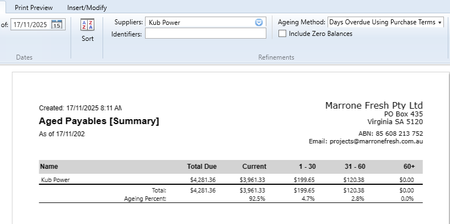
Thanks for the screenshots. The mix-up between the Aged Payables report and Outstanding Purchase Analysis usually comes down to how each report treats dates and transactions. Sometimes it happens if a payment was entered using Spend Money instead of Pay Bills, or because the “As of” date is being read differently. A good next step is to run the Payables Reconciliation report, it gives the most accurate snapshot of what you owe at a specific point in time. Also, make sure both reports are using the exact same “As of” date and the same ageing method. From your images, it looks like the ageing methods don’t match, which could be why the numbers are off. If that doesn’t clear it up, we can dig into your report settings and the individual transactions together. You can reach us via MOCA (our virtual assistant) to jump into live chat, or log a support ticket through My Account.
Cheers,
Princess