Forum Discussion


SamaraM
3 years agoFormer Staff
Afternoon Bronwyn (BronwynHamster)
Sorry to see that no one has offered assistance with your query. To give me a bit more context on the error you are experiencing, can you explain which screen you are looking at? Also is this while accessing AccountRight through the Web Browser?
If you could provide a screenshot of the screen that would also help.
If my response has answered your enquiry please click "Accept as Solution" to assist other users find this information.
 BronwynHamster3 years agoTrusted Cover User
Hi Samara,
- Card File
- Card List
- Employee
- New - this is where the Employee Self-Onboarding condensed window pops up
- Click on skip - New Employee window remains condensed rather than reverting to full screen
I can't send you a screen shot as employees information is also shown.
When I maximise the window to revert to settings if I switch windows mid-typing a field then switch back the field is highlighted and unless I click at the end of the field before I start typing the field is cleared.
Cheers,
Bronwyn
- SamaraM3 years agoFormer Staff
Hi Bronwyn (BronwynHamster)
Thank you for responding. I've tried to reproduce the steps you mentioned and am not coming across the same issue, which leads me to think something environmental is causing it.
Can I get you to check if you are using the latest version of Windows? If you check for available updates it will let you know if you are not up to date.
To do this:
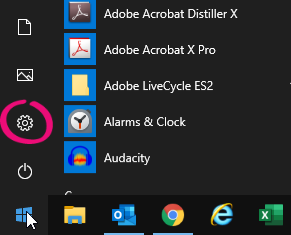
- Click the Windows Start button and click the Settings icon to open the Windows Settings screen.
- Click Update & Security then click Check for updates. If you can't access your windows updates, you might be in a network where you'll need to get your IT administrator's help.
- If updates are available:
- Select all Important updates.
- Select any Optional updates which refer to .NET Framework.
- Click Install to install the selected updates.
- Restart your computer.
Do let us know how you get on with the above steps.
If my response has answered your enquiry please click "Accept as Solution" to assist other users find this information.
- Click the Windows Start button and click the Settings icon to open the Windows Settings screen.
Looking for something else?
Search the Community Forum for answers or find your topic and get the conversation started!
Learn, solve, grow
Level up your skills and find answers across all MYOB products


