How to include weekend hours to annual salary
Hi everyone, I've noticed that the annual salary on the payslip is only calculated from the base hourly rate by the weekly hours, which is not reflective of the annual salary as it doesn't include the regular weekend hours which have a different rate. On the payslip, the gross pay displays $1,373.60, so the annual salary should be $1,373.60 x 52 = $71 427.20, but the payslip displays $59,529.60 as the annual salary, which is reflective of $1,144.80(weekday gross) x 52. In the employee's card, I had already made sure that the saturday wage pay item had been added to the standard pay tab with the regular hours entered as well as selected the saturday wage pay item in the wages tab as well, however the annual salary does not change despite anything I do. Is there any way to fix this? Thanks6Views0likes0Comments
Get rid off self-onboarding invitation
Hi All, I'm having the same issue again when setting a new starter. I don't want them to complete anything from their end, it seems I can't disable the automatic invitation that gets sent to them. I already untick the options, but keeps happening. There used to be an option to complete this manually, but it appears that option is no longer available. Is there a permanent setting to disable the self-onboarding invitation (previously via flare, I believe). Regards, Indigo129Views0likes1Comment
AccountRight MSI installer - auto update
We're wanting to push out AccountRight automatically to our PCs through intune. I tried the MSI installer, but this appears to not allow auto-updating. Is that correct? Is there a way to install AccountRight automatically using Intune, but allow auto-updating? Thanks!Solved100Views0likes2Comments
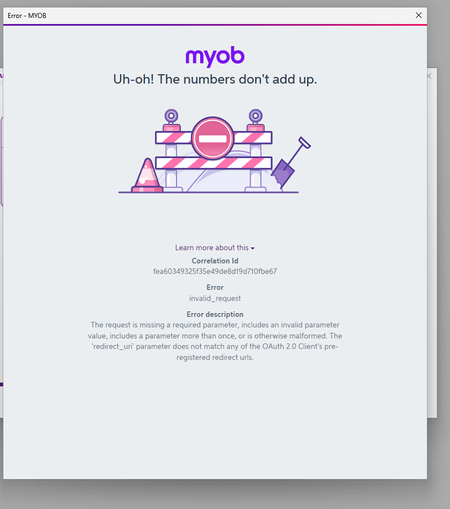
Uh-Oh! The numbers dont add up ERROR
Managed to get 2025.11 installed via .msi and now when we go to Sign in we get this. After spending the morning to get the download to work from MYOB's website now we cant even use the version. We have clients using MYOB Teams reports and we need to do payroll. 2025.10 wont allow us to get those reports now that the new version is down. Please can someone fix this!751Views4likes16CommentsDownload MYOB AccountRight Server Edition 2025.11
Hi Trying to download the server edition released yesterday 2025.11. When clicking on the download link on the web page all I get is this. This XML file does not appear to have any style information associated with it. The document tree is shown below. <Error> <Code>AccessDenied</Code> <Message>Access Denied</Message> </Error> I can download the previous version just not the current one.803Views2likes23Comments
Foreign currency invoice shows AUD amount
We use Accountright with foreign currency enabled. We recently upgraded to MYOB's new invoicing. Since then I have noticed that when customers click on the new "View invoice" button when a USD invoice is emailed to them from MYOB, a summary at the top of the page incorrectly shows the amount in our home AUD currency. For example, we sent a USD invoice for USD$11,990 and the summary at the top of the page that shows when the customer clicks on "View invoice" says INV-223920 for $18,330.53. This is misleading and confusing for our customers in other countries and needs to be fixed please. The summary at the top of the screen should show the amount owing in the currency of the invoice.75Views0likes1CommentIssue with Order/Invoice Number Sequence
Hi, Could you please assist with an issue we're experiencing around our numbering sequences? We've configured our system so that order numbers and invoice numbers follow the same sequence, while quotes use a separate one. Previously, this worked seamlessly whenever we created an order or invoice, the system would automatically pick up the latest number from either sequence and increment accordingly. However, this is no longer functioning as expected. We're now having to manually adjust both order and invoice numbers, which defeats the automation we had in place. For example: If the last order/invoice number used is 00327326, creating a new invoice correctly generates 00327327. But when an EDI order comes through, instead of continuing from 00327327, it reverts to 00327326, which has already been used causing duplication and confusion. Could you please advise on how we can resolve this and restore the automated sequencing? We have tried fixing it from the Set-up and going to Sales Numbering but until now we can't resolve it. We are using MYOB Account Right. Thanks so much, Victoria
Invalid Fingerprint Error
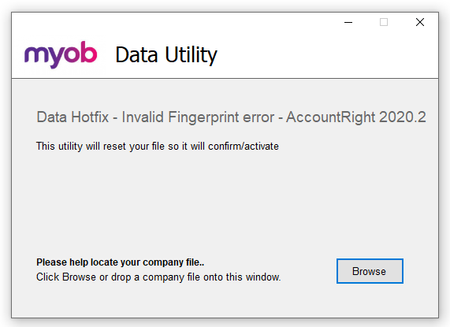
Hi Everyone Products: AccountRight Got a question about using the below tool? There is a second post on this thread that does answer commonly asked questions - scroll down to see that post or click here. We have seen a number of cases of offline company files that, following an AccountRight upgrade, are not opening or closing unexpectedly or generating a "Something has gone wrong message." This article contains information on identifying if you are impacted and running the necessary tool required to repair that file to allow it to be opened: How do you determine you are impacted? Following an AccountRight upgrade, if you are not able to open an offline company file, or you are encountering a "Something has gone wrong" message do check out the diagnostic file for the application - this can be opened in NotePad or another similar application. If you are needing to run the following tool, that diagnostic file would contain traces of the wording "InvalidFingerPrint" Example line in diagnostic file would: MYOB.Huxley.UI.Decorators.DecoratorFaultProcessor,Error,1,Unhandled error. : MYOB.Huxley.API.HuxleyActivationException: (InvalidFingerprint): Running the Tool: *Please note, this process will work for any AccountRight files from version 2020.2 or newer If you do see cases of "InvalidFingerprint" in that diagnostic file, do look at completing the following steps: Close AccountRight Download the following tool: AccountRight Hotfix tool Having trouble accessing the download? Right-click and select Save Link as Navigate to where you have saved that file - typically the Downloads folder on your computer Find the Hotfix tool zipped file (Data Hotfix - Invalid Fingerprint error - AccountRight 2020.2.zip) and select to extract the data - typically right-click and Extract All... Once extracted, select to run the AccountRight_Hotfix.exe file. This will open the tool: Please note that depending on your IT setup you may need to be logged on as the Windows Administrator. Browse to the impacted file and select Open once located Indicate that you have a backup of the file and then Apply. Should you be successful you would encounter the following message: Once you have that message, close the tool and open the file in AccountRight as per normal. Note: You may be prompted to re-confirm upon opening but this can be done online using the Confirm Online function.26KViews4likes1CommentCreate a thread for software bugs
Need to have a thread in this community for software bugs (if there is already one please let me know) AccountRight Desktop is incredibly buggy. We have been using it for two months now and I am amazed at how bad it is. We moved from AccountRight Enterprise to the online Plus and there are so many things that drive us crazy. I just feels like these are not software Ideas but actual things that need to be fixed. I don't know if the programming team don't know about them or just don't care because I have spoken extensively with the call centre and each update comes out and nothing seems to change.