User Access
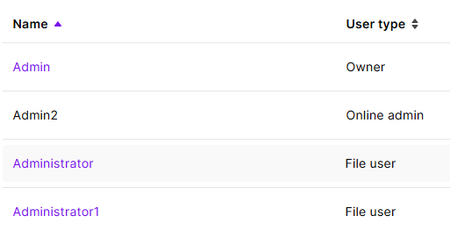
Hi, We generally use AR, however I use the online portal too. We have just migrated to a new email address, and when we started doing it instead of changing my email for my login I created a new user. I have now got my email up and running, however I made the other user inactive as it didn't do what I needed it to, and now it has gone black and I cannot access it. It still has my new email address on it and I cannot get into it to remove, which means I cannot add my email address to my current profile as it thinks there is a duplicate. I currently use the "Admin" login as the files owner, and the "Admin2" is the one that I'm trying to delete. Please see screenshot below, the text is black and I cannot get into it. In our AR software this user is not there anywhere, only on our online profile. Is there someone within MYOB that can access it, or am I now stuck with an email address that I cannot use. Our current email that is attached to MYOB will be being closed once we have let the forwarding work for awhile and everyone has our new email. Many Thanks, Sharyn197Views0likes7Comments
Incorrect Due Date Displayed on COD Supplier Bills
Hi, I've recently noticed what appears to be an issue with the due date being assigned to supplier bills. We received and uploaded a supplier invoice with: Invoice Date: 04/09/2026 Payment Terms/Due Date: C.O.D. However, after the bill was created in MYOB, the Bills List screen displayed a due date of 04/10/2026, effectively treating the invoice as being due 30 days from the invoice date. Because the bill appeared as not yet due, it remained unpaid. We only became aware of the issue when the supplier contacted us to follow up on payment. Could you please advise: Is this a known issue? Are there any settings within MYOB that could cause a COD invoice to be assigned a due date one month from the invoice date? Is there a way to ensure uploaded supplier invoices with COD terms default to the invoice date as the due date? I look forward to your advice. Thanks...Michelle
No bank account number shows on Statements
Is there a way to have my bank account number on my statements? I have had a look at the templates and cant see a way to add it (Browser). More than once I have been told there is no bank account number. The number is on the invoice I send out, but if I am sending out a separate statement at the end of month, some people will just receive that and want to pay online via internet banking.
supplier terms when creating a bill - works on desktop - not on browser, why?
Hi, When we used desktop to convert files in in tray to a bill, the supplier terms pull from the card automatically. But when we use the browser to create a bill from uploads, it does not use the terms on the supplier card at all. This means when we use the browser to enter up bills, we have to manually adjust the term on every bill, which is a huge huge unnecessary time cost to running our business. Why is it doing this? is it my browser (note I have tried on different browsers and different devices and they all do the same) or is it some setting /somethings else? and is there a fix? (I sure hope so)Failed to load Payables reconciliation with tax report
Hi there, I can't seem to be able to load a payable rec report past the 23rd May 2025. I have tried to clear cache and browsing data, and I have saved my reports settings as suggested in previous post. Unfortunately the issue persists. Could you please help me? Thank you304Views1like6Comments
Annual Leave not accruing
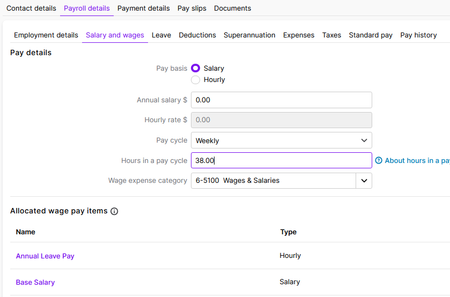
Hi there, We have recently moved over to MYOB Business Lite. I am new to setting up employees for payroll. I have noticed that the annual leave is not accruing or showing on payslip each week. On the employee cards, under Salary & wages, for some reason the salary amount is $0.00. I'm assuming that there should be a gross amount figure in it? Apart from the salary amount, is there anything else I need to check or to make sure the leave accrues, and how would I alter leave accrued to date? Thank youSolved376Views0likes2Comments
Template issues
Can you please tell me how, on the new online version we can customise the templates to show job numbers - this is an integral part of our business and the new format will not let us add a "job no" column as the desktop version does. Also on occasion we need to alter an invoice at point of sale - how do we do that once it has been recorded - the invoices are locked nad connot be altered as in the desktop version PLease help this is urgent for us107Views0likes1Comment