Invoice Emails Bouncing to Client
Hello MYOB, We are experiencing issues with invoices sent to one of our clients, which are bouncing back from the client’s email system. The email address has been double-checked and is confirmed to be correct, but the emails are still boucing back. The bounce notification we receive contains the following message: Sorry, email delivery was unsuccessful. Diagnostic-Code: rejected For context, the client uses Google Workspace for their email, and we have already whitelisted MYOB email domains (noreply@myob.com and Apps.myob.com) on their side. Despite this, the emails continue to bounce. Thanks, JohnEmails failing to send
Hello, I'm not sure if this is only affecting certain email domains but I have one customer who's invoice email bounces when sending from MYOB, but sending manually from gmail is fine. This has only started happening over the past 2 weeks. The error is: Diagnostic-Code: smtp; 550 5.7.515 Access denied, sending domain APPS.MYOB.COM doesn't meet the required authentication level. The sender's domain in the 5322.From address doesn't meet the authentication requirements defined for the sender. To learn how to fix this see: https://go.microsoft.com/fwlink/p/?linkid=2319303 Spf= Fail , Dkim= Pass , DMARC= Pass [SYYP282MB1359.AUSP282.PROD.OUTLOOK.COM 2025-07-21T03:17:52.984Z 08DDC77739D65DC8] [MN0PR03CA0016.namprd03.prod.outlook.com 2025-07-21T03:17:53.088Z 08DDC76C9A8BB377] [MN1PEPF0000F0E3.namprd04.prod.outlook.com 2025-07-21T03:17:53.090Z 08DDC6EAB80E3C9D] --1753067873-eximdsn-333674687 Thank you. KylieSolvedBlacklist Check: Diagnostic-Code: rejected
Hi there, We've had multiple customers contact us regarding bounceback messages from MYOB when they try to email our accounts team. Example: Sorry, email delivery was unsuccessful. Destination: accounts@hunterdouglas.com.au Sent: January 15th 2025, 7:53:33 am Message: Please contact us immediately if you are unable to detach or download your Remittance Advice. Thank you. Diagnostic-Code: rejected Last successful email to accounts from MYOB was on the 6th of January. Looking at similar cases on the MYOB forums, most were due to the recipient email address being blacklisted in MYOB. Could you please check and confirm if this is the case for us and fix if it is? Thank youSolvedEmail Invoice not sending
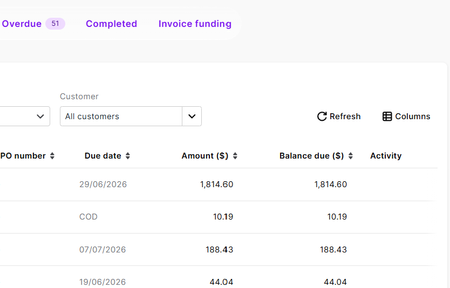
I have one invoice that I didn't realise hadn't sent until days later. I complete the invoice, click share > email invoice, attach photos and type my email content and hit send and all seems good, I get no errors or anything. But then when I check the invoices list the Activity column for this email is blank. All other invoices that I email have something in this column but not this one. Why would it not be sending and not giving me an error message of some type?Solved374Views0likes3CommentsRecurring transactions emailing invoices
Hi MYOB, I'm looking for help in setting up a recurring transaction that emails itself to the client. I don't need a reminder I have the recurring transaction working OK Is this an available feature? I can see plenty of threads asking for this but not answered. ie: an option below to: "email invoice to customer billing address" - checkbox Cheers Enceladus DigitalSolvedEmail invoices - "Diagnostic-Code: rejected"
I'm working with a business that is unable to receive MYOB invoices/statements from a supplier. There was recently a problem with the businesses email service, I suspect MYOB may have blocked the email address, as MYOBs email service will have received NDR bounce back emails while the customers email service was offline. Looking at Vendor Reporting Emails bouncing - Diagnostic-Code: rejected | MYOB Community it seems Leneth_A was able to remove the address from a blacklist and/or add it to a whitelist. Can I request a DM to provide customer details/email address to investigate? Email from MYOB below From: ***hidden for privacy*** <bounce@apps.myob.com> Sent: Tuesday, May 28, 2024 1:07 PM To: Accounts Receivable <acc_rec@***hidden for privacy***> Subject: Undeliverable: Statement From ***hidden for privacy*** Sorry, email delivery was unsuccessful. Subject: Statement From ***hidden for privacy*** Destination: ***hidden for privacy*** Sent: May 28th 2024, 1:01:20 pm Message: Dear Customer, Please see attached Statement of Account. Payments made on or after the last day of the month may not be reflected in the Statement. Please note, unless specific instructions are supplied at the time of payment, your payment will be applied sequentially to your oldest invoices first. Payments cannot be altered once applied. Regards, Accounts | ***hidden for privacy*** Diagnostic-Code: rejectedunable to access Print/Email Invoices list 'Unable to Connect' error message
Dear MYOB support We've been experiencing ongoing issues of being unable to access the print/email invoices function, Accountright error message displays 'Unable to Connect' (please see my previous posts regarding same issue). We have been dealing with this same problem for MANY months, with great frustration. While the print/email invoices list is not able to be accessed we've had no choice but to painstakingly email every single invoice individually = huge waste or our staff's time. About a month or so ago though & to our immense relief & amazement, this function miraculously started working again....hallelujha!! ...& we were once again able to access the Print/Email Invoices list so we could 'select all' & bulk email all invoices for the day. SO much quicker! However & incredibly frustratingly, as of TODAY the Print/Email Invoices function has stopped working again. It happens regardless of which user login is used & from whichever of our offices we login from & over various internet providers - as has been the case previously. All other functions continue working. Yesterday it was working...today it is not, and we have not done anything differently. All past suggestions from MYOB support regarding this issue have not been able to fix it. Given that the function recently started working again, without us doing anything differenty, but has now stopped working again, can someone from MYOB please explain what is going on? It is incredibly frustrating to be battling this issue with what is such a basic & necessary function. I look forward to a response.410Views0likes2CommentsSales Invoice Default print form not emailing as default choice
Client has two invoice templates setup, and each customer has setup in card file the choice of which template we want them to receive, when I print invoices great the correct default form is choosen, but when I log into online myob to send out the monthly invoices with multiple attachements, the default invoice form is not being picked up and some customers are getting the wrong invoice template sent to them. Where can the email template default be customized like we do for 'printing' in the card file.