Deploying AccountRight PC Edition via intune
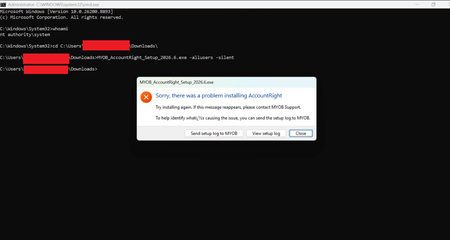


Thank you for sharing your experience. So, you haven't used the -allusers argument instead used -silent?

Tried it and it works manually but scripts will run it as SYSTEM which is broken and won't work at the moment. Same issue with trying to install using the system option in intune - runs as SYSTEM.
Per my original 2 screenshots the only way I could get it working when executed as SYSTEM was to change the home directory paths which makes it basically useless for deployment otherwise it will just error out. When done via intune etc. it is a -silent error too so not obvious something went wrong!
Yes, the manual installation is working fine. However, our preferred approach is to deploy applications through Intune, as this is the standard method we use for all other applications. We typically package and deploy apps using the System install behavior.
In my most recent attempt, I packaged the application with the System install behavior and used the following detection path which you mentioned:
%LocalAppData%\Programs\MYOB\AccountRight\
Since the application appears to install under the user's profile, I'm going to try packaging it again using the User install behavior to see if that resolves the detection and deployment issues.
Search the Community Forum for answers or find your topic and get the conversation started!
Level up your skills and find answers across all MYOB products


