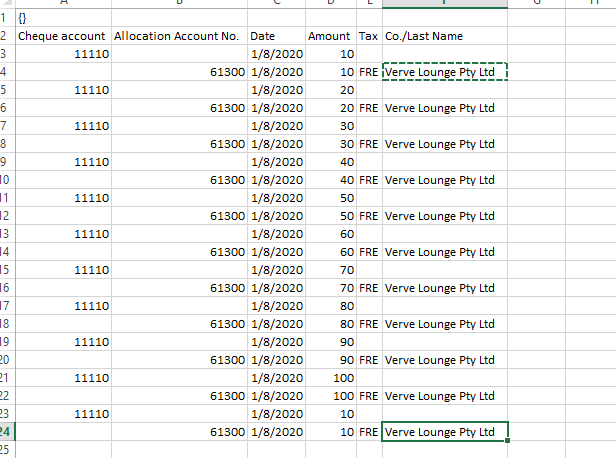
Hi All When i am importing a bank statement, it is showing error again and again. I am importing the statement as follow- 1. I have selected spend money under File type and choose the OF...
For multiple spend money transactions to import successfully, you need to ensure that there is a blank line in excel after each spend money transaction as shown in the image :
The screenshot you have provided does not have any blank lines to separate multiple spend money transactions, due to which the software treats it as one spend money transaction resulting into "Unbalanced transaction" error.
All transactions in AccountRight have two sides. Here is a sample Spend Money transaction of $10 I recorded in AccountRight, with the tax code being GST. You can then use Edit > Recap or press Ctrl + R to recap this transaction before recording, it will display all accounts/amounts being debited and credited. This exact information needs to be completed when preparing import files:
Then I've exported this transactions, this is what it looks like when viewed in Excel. As it shows, the columns with information filled are required by AccountRight in order to record the transaction above. Simply fill in your actual data in the corresponding columns, with any additional information if desired (Jobs, Memo, card etc), save the changes back to a text file for import. I've attached this sample Spend Money text file below.
I want to emphasize the importance of exporting a sample data from the same version of AccountRight for troubleshooting purposes. You may receive varies of different errors during imports, this method is useful for troubleshooting them all. The key is compare your actual import data to what AccountRight requires to spot the format/data difference.
Please follow this Help article if you are unsure how to create the template: Using an import template. If you encounter 'nothing to export', please record a sample transaction first, and make sure the export type matches the sample transaction recorded (e.g. export 'Spend Money' if it's a Spend Money transaction, there is also date filter).
If you have an active subscription, please feel free to contact our phone support team or utilize our LiveChat service. We also have the pay-per-call option available for non-cover customers if needed.
For multiple spend money transactions to import successfully, you need to ensure that there is a blank line in excel after each spend money transaction as shown in the image :
The screenshot you have provided does not have any blank lines to separate multiple spend money transactions, due to which the software treats it as one spend money transaction resulting into "Unbalanced transaction" error.
Looking for something else?
Search the Community Forum for answers or find your topic and get the conversation started!