Invoice incorrect due date


Hi Amanda,
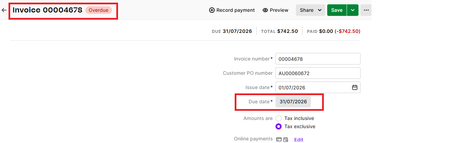
I tried changing the due date on the invoice to "1 day after the end of the month" and saved it.
and it changed it to the 1st August, and marked the invoice as being overdue, as expected.
I changed it back to "0 days after the end of the month" and it put the 31/7 on the invoice but 31/8 onto the invoice list view instead of the 31/7. It looks like when using 0 days with that particular date option it doesn't recalculate the date properly, perhaps? I don't' remember that particular date option before, perhaps it is new?
I tried changing the due date on the invoice to "1 day after the end of the month" and saved it.
and it changed it to the 1st August, and marked the invoice as being overdue, as expected.
I changed it back to "0 days after the end of the month" and it put the 31/8 back onto the invoice instead of the 31/7. It looks like when using 0 days with that particular date option it doesn't recalculate the date properly, perhaps? I don't' remember that particular date option before, perhaps it is new?
I contacted support and they confirmed that the newer EOM rules still have some problems
One of these problems seems to be when using a value of 0
Search the Community Forum for answers or find your topic and get the conversation started!
Level up your skills and find answers across all MYOB products


