Super Fund Batch failed because of ESA
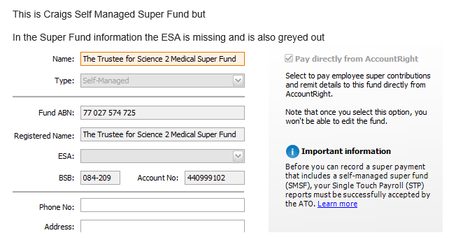


This happened to me too. I had to phone the SMSF's accountant to get the correct ESA
I have the same query
Should I reverse the entire super batch - all seems a bit unclear
The reversing process seems simple enough but
Reversing a Pay Super transaction reverses each of the contributions within the transaction (an individual contribution can't be reversed). It doesn't change any of your employees' pays. It just returns the contributions back to the Pay Superannuation window with all the other unpaid contributions.
seems to be the only instruction not To reverse a single Pay Super Transaction.
Hopefully when the payment comes back it will all be clearer.
Search the Community Forum for answers or find your topic and get the conversation started!
Level up your skills and find answers across all MYOB products


