Request for Clarification on Business Verification and Personal Information Requirements
I am seeking clarification regarding the recent business verification request, which appears to require excessive personal information. We do not use your online payment services and only use MYOB for invoicing and bookkeeping. Identity verification should be the responsibility of the ATO, and providing a valid ABN ought to be sufficient. We take privacy seriously and aim to comply fully while avoiding unnecessary exposure of personal information. Could you please specify under which law or regulation MYOB is authorised to collect personal details of all shareholders, rather than just key officers or directors? Additionally, I would appreciate details on how MYOB safeguards the security and privacy of this sensitive data. While committed to complying with all legal requirements, we seek to understand the basis and justification for this level of data collection. Thank you for your prompt attention to this matter.Remove 'Ship To' in a Few Clicks!
No products to ship? Let’s ditch that “Ship To” section! You shouted it from the rooftops, and we made sure to listen! If shipping details have no place on your invoices, here’s how to make them disappear for good: 1️⃣ Head to More → Customers & Suppliers 2️⃣ Select the customer or supplier you want to edit 3️⃣ Tap the ✏️ in the top right corner to edit 4️⃣ Under Shipping Details, clear all address fields, including country! 5️⃣ Hit Save—boom, you’re done! Moving forward, new customers won’t have a “Ship To” field by default unless you add their shipping details. For existing ones, just follow these quick steps to tidy things up. Keep it coming! Got more ideas to make Solo even better? Drop them in Share Your Ideas | MYOB Community —we’re all ears, and your feedback helps shape what’s next! 🚀207Views3likes0CommentsYour clients' ABNs on invoices — vote here 👇
Hey Solmates! Adding your client's ABN directly to their details on a Solo invoice — sounds like a no-brainer, right? Hit that vote button if this is something you need, and help us show the product team just how important it is (and feel free to drop a comment on why you need it). 💡 In the meantime: you can add ABN details in the Notes to Customer section of your invoices as a workaround. Not perfect, but it'll do for now!78Views1like0CommentsMore ways to share your invoices!
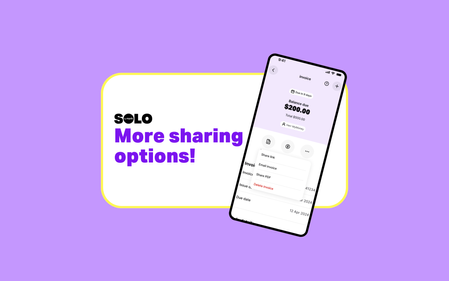
Good news, Solmates! We heard you needed more options when sharing your invoices, so we made it happen! Now, when you share an invoice, you’ll see two new choices: Share link – Sends a short text with a shareable link to the invoice. Perfect for text messages, especially between iOS and Android. Share PDF – Creates a PDF straight away. Great if you want to download a copy or prefer sending the PDF itself. Best of both worlds 🙌 Just make sure you are on the latest version of the app! 😉 Earlier this year, we heard from our Solmates that sending a PDF via text using the “Share invoice” option wasn’t always working. Our dev wizards landed on a solution: instead of attaching a PDF, let’s send a short text with a link to the invoice. Easy peasy — no more failed texts, problem solved (or so we thought). We rolled out that solution and quickly learned that many of you really needed the PDF sharing option. As soon as we saw the impact, our product team sprang to action and, in record time, designed and released a solution that gives you both options. One extra callout worth sharing: emailing an invoice directly from the app using “Email invoice” hasn’t changed at all. That option still works the same way it always has and includes both the web view version and the PDF version of the invoice. At Solo, we always aim to get things right the first time — but sometimes it takes a second go. As luck would have it, our Solmates are absolute legends, and thanks to you, we were able to ship this update within three weeks… which, in dev time, is pretty speedy. As always, thanks for the feedback and ideas — we’re always listening 💜131Views1like0Comments
Invoice PDF attachments
Hello, Is there any way to make PDFs included by default when invoices are sent to customers? I am certain the PDF option was previously "sticky" so it retained whatever was selected last time, and I had it turned on, but perhaps a recent update has changed this behaviour? One of my customers has complained this morning that they did not receive a PDF invoice, so after I had a look I discovered the PDF option was not checked when I used the share function, when previously it was. It is just a small thing, but it is something else I'll need to remember to do each time I send invoices out. A lot of my larger clients have automated systems that only look for PDF attachments and don't know how to click buttons in emails to retrieve invoices. Thanks, Kylie.Solved
ALL Invoices Not Showing
Hi all, For the past three days, I have been trying to view all, in progress and completed Invoices. Nothing is showing. So to confirm I am on a desktop, I go to sales in the menu on the left and click invoice. No matter what I do with the menu tabs across the top, I can not get any invoices to show. Currently, I have it set to all and the date range for this entire financial year and nothing shows. Can anyone help? I figured it is something wrong with the software, but after three days I thought it would be fixed. Thanks.612Views1like3CommentsRecurring transactions emailing invoices
Hi MYOB, I'm looking for help in setting up a recurring transaction that emails itself to the client. I don't need a reminder I have the recurring transaction working OK Is this an available feature? I can see plenty of threads asking for this but not answered. ie: an option below to: "email invoice to customer billing address" - checkbox Cheers Enceladus DigitalSolved