Forum Discussion

jackH1's avatar
jackH1
Contributing User
2 years ago

Applying multiple tranfer to 1 payroll transaction

Hi Everyone,


I have an employee who has likes a split payment and has been paid into 2 seperate bank accounts and this is now unable to be reconciled in the bank feeds and applied to the one employee payroll transaction. This dates back a couple of months as it was beeing applied incorrectly in bank feeds so has unfortuantely been missed.


Hoping there is an easy work around in applying this without having to undo multiple pay runs.


Thanks,

14 Replies

  • Moon239's avatar
    Moon239
    Contributing User
    1 year ago

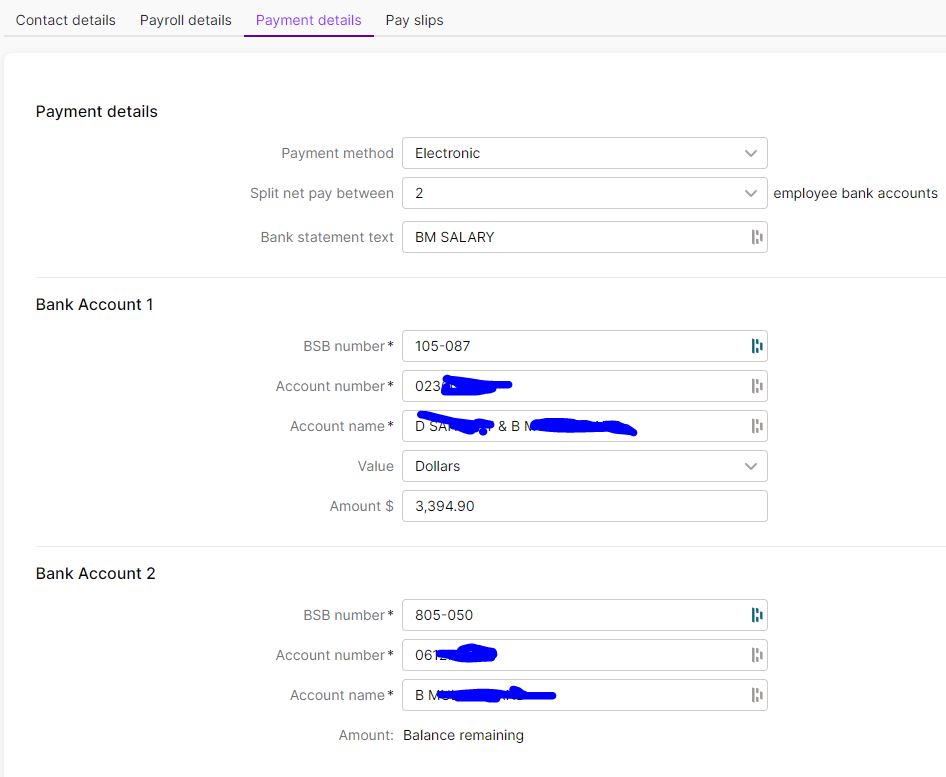
    I have the same situation ... Yet when i go to set p the employee for split payments in the employee file - in $ and % it does not seem to save? (maybe it does?) how would i now as it does not keep any data after i save?


    --- I sent this to support - yet no answer 

    I am encountering an issue with processing a split payment for one of our employees within the MYOB system. Specifically, the payment needs to be divided between two different bank accounts as per the employee's instructions. After accessing the employee's electronic file in MYOB, I entered the dollar amount for the first transaction and intended for the balance of the fortnightly pay to be allocated to the second account. Although I pressed 'save', the screen does not reflect the changes as saved. This issue persists even when trying to save the split as a percentage (84.38% for the first account, with the remainder for the second). Could you please advise why the changes do not appear to be saved? Is there a step I'm missing or a known issue with split payments that I should be aware of? Your guidance on resolving this matter would be greatly appreciated.

  • Doreen_P's avatar
    Doreen_P
    MYOB Moderator
    1 year ago

    Hi, Moon239


    Thanks for your post.


    Did you receive any error messages when trying to save the changes made? If yes, kindly attach a screenshot of the error. Make sure to remove any sensitive information before posting in the Forum. Also, please ensure that the BSB number, account number and account name are entered as well. Please let us know how it goes.


    Best regards,

    Doreen

  • Moon239's avatar
    Moon239
    Contributing User
    1 year ago

    No error message

    all steps and data are correct

    says saved at the top 

    but reverts back to nothing in the fields! and Percentage %

    i have cleared the all browser settings and tried on Edge, Firefox, and chrome

    all the same results.


    i am at a loss


  • Doreen_P's avatar
    Doreen_P
    MYOB Moderator
    1 year ago

    Hi, Moon239


    Thanks for your response.


    We tried replicating the concern on our end and were able to make changes and save the percentage of the split payment. Even after refreshing the window, the percentage is still there. With that, are there other users of the business file that can make changes to the employee file? If yes, kindly advise the other user to make changes to see if the same happens. Please let us know how it goes.


    Best regards,

    Doreen