Forum Discussion

greyclan's avatar
greyclan
Member
1 day ago

Accountright SE Edition

Due to the upcoming changes with Accountright, I am not in a position to have an online file.  I have installed the Server Edition, but when I try to back up it says:


"The connection to the server was lost.  Please check that the server is on and connected to the network"


Has anyone got any ideas on how to remedy this.


Thanks

Maria

3 Replies

  • Earl_HD's avatar
    Earl_HD
    MYOB Moderator
    1 hour ago

    Hi greyclan,

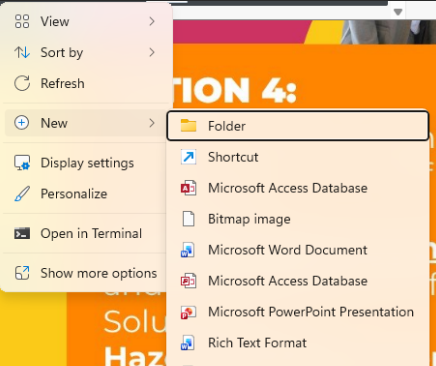
    To add a folder, right-click in Windows, select New, then choose Folder. 
    Please see the attached image for reference.


    If the issue remains the same, please reach out to our team so they can help you with this. You can reach them on Live Chat via our virtual assistant, MOCA or by submitting a support case via MyAccount.

    Regards,
    Earl

  • Hi Genreve


    Thanks for that, yes the .backup is missing.  How do I add this

    Regards

    Maria

  • Genreve_S's avatar
    Genreve_S
    MYOB Moderator
    5 hours ago

    Hi greyclan


    Thanks for describing your concern clearly, This error message usually points to the Server Edition library setup rather than the network. It happens when the hidden .backup folder is missing from the Server Edition library location.

    I recommend you try this on the host/server computer:

    1. open File Explorer
    2. turn on Hidden items
    3. go to the library location for the company file
    4. check if there’s a folder called .backup

    If the .backup folder is missing, that would usually be the cause of this error. Adding that missing folder generally fixes it.


    If you are still having issues after that, I recommend reaching out to our support team so they can troubleshoot further. You can reach out by creating a ticket in My Account or connecting with our live chat team through MOCA, our virtual assistant. 


    Regards,
    Genreve