Forum Discussion

esemel's avatar
esemel
Contributing User
4 months ago

AccountRight Windows cannot be moved, only resized

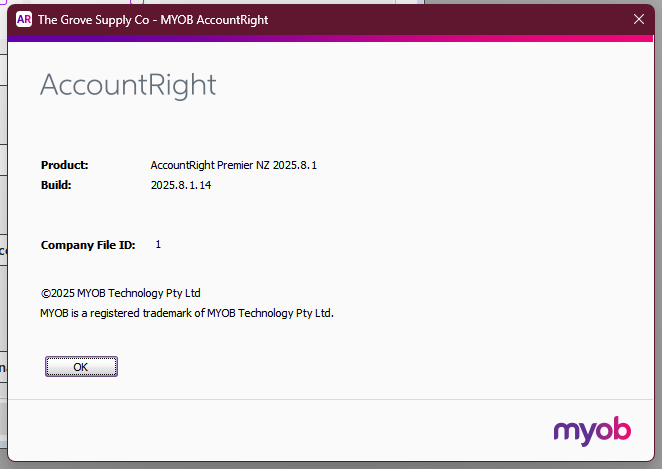
Affects: AccountRight Premier NZ 2025.8.1
Build: 2025.8.1.14

Using two monitors:
- Command Centre window can be moved
- any other window shows a double-head arrow and only resizes that window

- Setup, Preferences, Windows shows 'save window positions' as ticked
- if you untick it, restart AR, then there is no change to the issue, i.e. either ticked or unticked does not change the annoying behaviour. 

I have also cleared the Cache as per https://community.myob.com/discussions/accounting_software_general/clearing-the-accountright-cache/592973 

The issue only happens when using two monitors with the laptop. If I run AR on the laptop's screen or with just one monitor attached to the laptop then I can move the windows as expected.


People obtain two screens so they can run them to advantage.
I'm sure the clever minds at MYOB could come up with a solution for running dual monitors?

I found an exactly identical issue in your Community from 6 years ago : 
https://community.myob.com/discussions/accounting_software_general/windows-not-resizing-accountright/780415  - was this ever resolved?

Looking forward to a solution....

6 Replies

  • Doreen_P's avatar
    Doreen_P
    MYOB Moderator
    4 months ago

    Hey esemel,


    Thanks for the detailed rundown and kudos for checking that older Community Forum post too. Given you’re on AccountRight Premier NZ 2025.8.1, the first step is to update to the latest release and then resize and move the windows again, as newer builds can tidy up window behaviour across versions. Next, hop into your Windows display settings (right‑click the desktop > Display settings) and check that both monitors have the Scale & Layout and Screen resolution set to the recommended values. Mismatched or high‑DPI scaling across dual monitors can cause quirky window movement and resizing in desktop apps like AccountRight. If that still misbehaves, make sure to reach out to our team on Live Chat via our virtual assistant, MOCA, or by submitting a support case via My Account. They'll be able to check this out for you.


    Cheers,

    Doreen

  • esemel's avatar
    esemel
    Contributing User
    4 months ago

    Hi Doreen,

    Thank you for your reply.

    I have searched your website but it appears that 2025.8.1.14 is the most recent build. And as per my original message that is the build I am on already.......Am I missing something?    September 2025 Latest Release

  • esemel's avatar
    esemel
    Contributing User
    4 months ago

    And I asked the virtual assistant whichthat was a waste of time really - it didn't understand what I meant by latest build of AccountRight !

  • Princess_R's avatar
    Princess_R
    MYOB Moderator
    4 months ago

    Hi esemel,


    You’re not missing anything, AccountRight 2025.8.1.4 is the latest build version and you’re already on it. Since you’re up to date, try checking your display settings like Doreen_P mentioned and see if that helps. If that still doesn’t do the trick, our support team can dig deeper. You can call us, lodge a ticket via My Account, or hop on live chat through our virtual assistant MOCA. I know It might miss your point at first, but once the suggested answers don’t help, it’ll connect you to the team.


    Cheers,

    Princess

  • esemel's avatar
    esemel
    Contributing User
    4 months ago

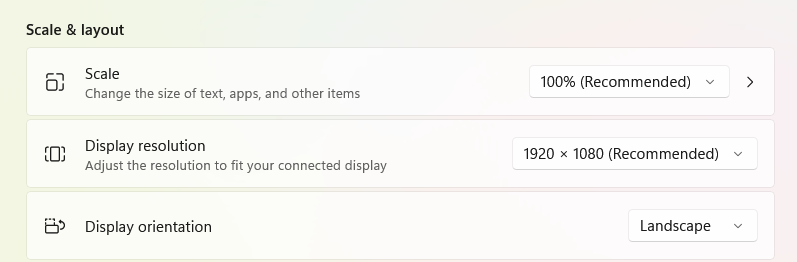
    Thank you for the reply, Princess. I did check both of the monitors, before and again, and both show as "Recommended" (see screenshots attached.

    I have also tried the virtual assistant which was less than helpful and I have also created a ticket through myMYOB. I can try the virtual assistant again, if you think that will get me through to a human ??


  • esemel's avatar
    esemel
    Contributing User
    2 months ago

    So, two months have gone by since I created this comment.....

    I have opened two Support tickets, one of them titled "Complaint". The latest recommendation from the Senior Product Specialist was to check the re-sizing .... oh look, that's what Princess suggested two months ago!!!


    I have been given the same advice several times, and mostly very superficial advice at that, none of the support people seem to read any of the notes in the tickets, and here we are with the same advice again, and a “specialist” throwing his/her hands in the air with a “not our problem” attitude.


    I have discovered that there are some windows that CAN be moved, sometimes different coloured widows (possibly different levels in a hierarchy of windows, or different areas of code) display different behaviour, most would only re-size, while some (only a few) would display the correct behaviour, i.e. move rather than re-size with the correct cursor. This might be a possible avenue of investigation if MYOB were interested.....


    The MYOB Support team have not been very helpful to be honest. The Senior Product Specialist only realised what the issue was yesterday after I sent them the video of the behaviour I had sent over a month previously and was, I assumed, in the records. 

    So I decided to try a different laptop to see if that makes any difference and to ascertain whether it's the monitor's connections, the laptop itself or the MYOB application......Not one of the support people (or Senior Product Specialists) have suggested trying a different laptop !


    My current laptop, displaying the annoying behaviour, is a new Lenovo Ideapad Slim 3, running the most recent update of Windows. I have now tried again with an older laptop, an HP-ZBook-Laptop, running Windows that is not quite up to date.

    The HP does NOT show this behaviour, i.e. the child windows can be moved and the annoying re-sizing cursor doesn't show on some of the windows rather than the moving cursor, and so the monitors and their connections are NOT the problem. It appears it is more likely to be the compatibility of the MYOB application with different brands of laptops.


    Perhaps in the MYOB Release Notes there could be a  list of compatible devices.....