Forum Discussion

ElleHall's avatar
ElleHall
Member
2 years ago
Solved

GST on Dashboard

Hi 

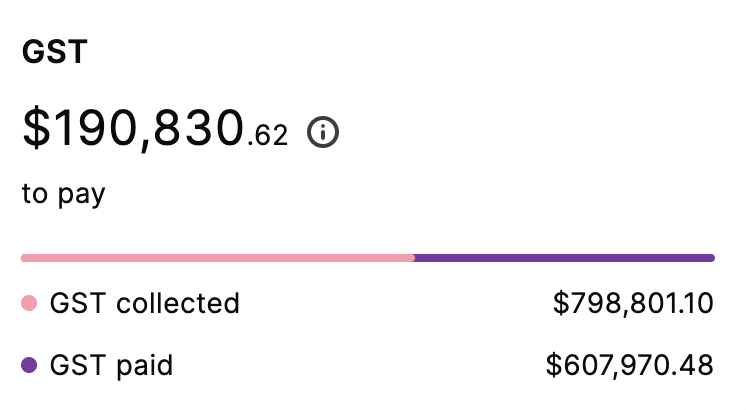
Where is the GST amount displayed on the dashboard filtered in from? I have a client and their GST is showing a large amount doesnt appear to be correct? 

  • Hi ElleHall


    Welcome to the Community Forum. 


    The GST amount shown in the dashboard is based on the running balances of your GST Collected and GST Paid linked accounts. For further details for all the information shown in the dashboard, I recommend reading through the article 'The New Dashboard'. 


    Let us know if you require further help.


    If my response has answered your inquiry, please click "Accept as Solution" to assist other users find this information.


    Thanks,
    Genreve

6 Replies

  • Mike_James's avatar
    Mike_James
    Ultimate Cover User
    2 years ago

    Hi AliHug , the moderator's reply indicates that the dashboard displays the running balance of the two GST accounts. If you want the display to reflect current GST only, then when you file a GST/BAS return, you need to transfer out the GST content from those two accounts to a GST liability account, and code the payment to that account. Then the balance remaining is current GST only. 


    If you haven't been doing this, then an adjustment can be done at any time, with care.


  • Genreve_S's avatar
    Genreve_S
    MYOB Moderator
    2 years ago

    Hi ElleHall


    Welcome to the Community Forum. 


    The GST amount shown in the dashboard is based on the running balances of your GST Collected and GST Paid linked accounts. For further details for all the information shown in the dashboard, I recommend reading through the article 'The New Dashboard'. 


    Let us know if you require further help.


    If my response has answered your inquiry, please click "Accept as Solution" to assist other users find this information.


    Thanks,
    Genreve

  • AliHug's avatar
    AliHug
    Contributing User
    2 years ago

    I have exactly the same issue and cannot see any logic when I know I am up to date with GST payments.


    Reading the information on New Dashboard does not help.


  • Shella_A's avatar
    Shella_A
    MYOB Moderator
    2 years ago

    Hi AliHug,


    I appreciate your effort in checking our help article. The figures in this section reflect the current running balances of your linked GST Collected and GST Paid categories. You can compare these balances with the general ledger report for these categories and see the transactions that make up these amounts. Ensure the report's accounting method matches your GST reporting method and the report date is set to today. For more details, refer to our article on how GST figures appear in the dashboard. Manage linked accounts accordingly.


    Feel free to post again anytime you require further assistance.


    If my response has answered your inquiry, please click "Accept as Solution" to help other users find this.


    Kind regards,

    Shella

  • tanianorton's avatar
    tanianorton
    Experienced User
    18 hours ago

    Hi,

    I know I am way behind the original discussions, however, I am still trying to get the GST figures on the Dashboard to show correctly.

    Why does the GST figures on the Dashboard show just as GST collected? Why doesn't GST Paid show?

    Why does it show a running total, instead of an acurate figure for the financial year, or period that you have selected for the tables etc?

    Looking forward to a response.

    Thanks,

    Tania Norton

  • Genreve_S's avatar
    Genreve_S
    MYOB Moderator
    18 hours ago

    Hi tanianorton


    Thanks for the questions.


    The dashboard GST total uses the running balances of your linked GST Collected and GST Paid categories for the current reporting period. If GST Paid isn’t showing, compare it with the General ledger report for the GST Paid category to see which transactions are included.


    The dashboard doesn’t use the financial year or date range selected in your reports. For a like-for-like comparison, make sure the General ledger uses the same accounting method as your GST setting and is dated today.


    More information is here:
    https://www.myob.com/au/support/myob-business/get-started/welcome-to-myob-business/the-dashboard?productview=Browser


    If the figures still don’t look right, please get in touch with our Support team so they can investigate further. You can create a support request through My Account or connect with our live chat team through MOCA, our virtual assistant.


    Regards,

    Genreve