Forum Discussion

bdc's avatar
bdc
Contributing Cover User
7 days ago

ELECTRONIC PAYROLL PAYMENTS REVERSAL

I have processed payroll payments and they are waiting to be actioned in the electronic payment section, which i haven't set up or want to.  Payroll payments usually have come from default bank account. These payroll payments are not showing in my bank reconciliation. What can I do to see these payments in my bank reconciliation for the bank account they have been paid from.

5 Replies

  • Princess_R's avatar
    Princess_R
    MYOB Moderator
    7 days ago

    Hi bdc,


    That’s a great question. It is a bit strange for this to happen if you didn’t intentionally switch your employees over to electronic payments. If you haven't approved that setup, it’s a good idea to double-check your linked accounts and your team's payment methods.


    Employee payments may be missing from your bank reconciliation if they’ve been sent to the electronic clearing account instead of directly to your main bank account. You can clear the payments from the electronic payment holding queue and post them to your bank account. Take a look at this forum post too, it has some great extra tips.


    Cheers,

    Princess

  • bdc's avatar
    bdc
    Contributing Cover User
    14 hours ago

    Can you explain how i clear the payments from the electronic payment queue and post them to my bank account used for payroll. I do not have authority for from bank to process ABA files, and the team has been paid manually already.

  • Genreve_S's avatar
    Genreve_S
    MYOB Moderator
    13 hours ago

    Hi bdc, 


    Thanks for clarifying. As the team has already been paid manually, these payroll transactions still need to be processed in the Prepare electronic payments window so they can be matched to the withdrawals in your bank feed.


    Someone with access to that window will need to process the transactions individually, using the same date and amount as the corresponding bank transaction. Where needed, process them as separate batches so each payment matches the correct bank withdrawal.


    There isn’t a way to bypass this step or clear the payments directly from the queue. As the employees have already been paid, don’t upload the ABA file to the bank. Once the transactions are processed in MYOB, match each one to the relevant bank transaction.


    Regards,
    Genreve

  • bdc's avatar
    bdc
    Contributing Cover User
    12 hours ago

    Thank you for your swift response.

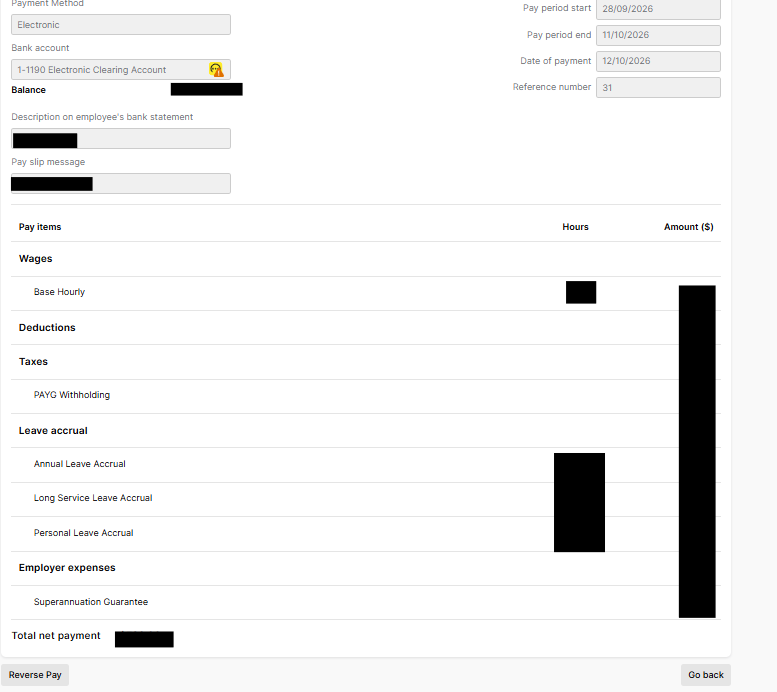
    How do I process the transactions.  If I click on on any particular one it takes me to a reverse pay screen.

    I do not want to do this.  


  • Earl_HD's avatar
    Earl_HD
    MYOB Moderator
    11 hours ago

    Hi bdc,

    I understand you want to process the payments without accidentally reversing them. You don’t need to open the individual payment or select Reverse Pay to process it. Go to Banking > Prepare electronic payments.
     

    - Choose a Payment type if you want to filter the list, such as employee payments.

    - Select the Account the payments will be paid from.

    - Enter the Date of payment and update the description or reference number if needed.

    - Select the payments you want to include.

    - Click Download bank file, then confirm the download.

    - Save the bank file and upload it through your online banking portal for your bank to process.


    Select the payments using the list, rather than opening an individual payment and choosing Reverse Pay. You can find more information here: Making electronic payments.


    I hope this helps!


    Regards,
    Earl