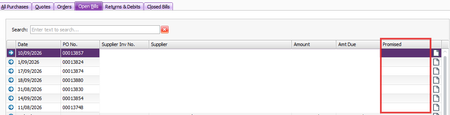
"Column chooser" improvements
Employee List: Add start date column. We can add termination date but not start date. The number of times I have to do a full export of cards to get an employee list with start dates is too high. Purchase Register: The "due date" would be far more useful than "promised date". At least it doesn't require any extra data entry. It's just an empty column. To find a due date from the purchase register, we have to open the invoice, and then click into the terms. Full customisation for all (or even most) available data fields would be wonderful.4Views0likes0Comments
Receive Payment in Different Currency via Import/Export Wizard
AccountRight Premier AU 2026.7.0, build 2026.7.1.21. Multi-currency is enabled. NZD exists in Currency List. Customer has default currency NZD and the invoice is an NZD invoice. Receive Payments imports successfully when Currency Code is omitted, but defaults the payment to AUD. When Currency Code = NZD is included, the import fails with: "SetProperty: Invalid Property Name: CurrencyId for type: MYOB.Huxley.API.Entities.IReceivePaymentEvent." MYOB’s current Receive Payments import specification lists Currency Code as a supported Premier field. Has anyone been able to get this to work. I've tried every possible combination I believe.To Do List - Accounts Receivable
I cannot get the Accounts Receivable To Do list to print out a total of every Sales Invoice owing. It will only print what is overdue at that given day. When I select the To Do List from the Reports menu, the "Overdue Balances Only" box is not ticked. The Accounts Payable To Do List prints every Purchase Invoice that is not paid (overdue and not overdue) What am I missing???
Issues setting up emails to send through Outlook
After following the steps outlined in the below instructions and restarting my computer, Emails are not sending, MYOB gives a pop up saying they have been sent via Outlook and all seems to working correctly but they don't go through. Sending emails using Microsoft Outlook334Views0likes4CommentsFlare invitation
Hi, Would MYOB please fix the bug that when an employee's onboarding invitation is deleted their employee's record is also deleted. I needed to change the employee's email address and this cannot be done without deleting the invitation. If resend is chosen, it sends to the old email address. Thanks kindly, Bronwyn72Views0likes2Comments
Opening multiple windows - AccountRight
Hi, I've noticed with the most recent update I can no longer have multiple windows open (Find Transactions and Card list for example). This is very frustrating and a massive downgrade, why does MYOB keep taking our features away? Very frustrated!Solved360Views3likes5Comments
Invoices - PDF Email Attachments Missing as of 19/08/2026?
Hi there, Just wondering I've just attempted to email some customers tax invoices and the PDF attachments using MYOB AccountRight and PDF attachments are not being attached. Customer can access the invoice via the View Invoice / View Full Invoice Details but the as of yesterday the PDF's were also attached to those and now they are not as of today for some reason. This is important and necessary function as many of my customers use purchasing systems that are only compatible with raw PDF's attached to the email and not with mere payment links. Has there been a system change / something we need to tick again?Solved179Views2likes4Comments