MYOB Reports Print with Faded Text or Incorrect Alignment — How Can I Troubleshoot This?
Hi everyone, I’m looking for some advice about print-quality issues when printing reports or invoices from MYOB. Sometimes a report looks fine on screen, but the printed copy has faded text, unclear details, or alignment issues. I’m trying to figure out whether the problem comes from the report format, PDF settings, or the printer itself. Before changing any MYOB settings, I’d like to test the printer separately using a printer test page to check text clarity, grayscale, color output, and alignment. A few questions: Has anyone experienced print-quality issues with MYOB invoices or reports? Is it worth exporting the report to PDF first to check whether the issue occurs before printing? What should I check first if the PDF looks correct but the printed document does not? Could printer settings such as scaling or print quality affect invoice alignment? I’d appreciate any suggestions from people who regularly print invoices, statements, or financial reports through MYOB. Thanks in advance!
Issues setting up emails to send through Outlook
After following the steps outlined in the below instructions and restarting my computer, Emails are not sending, MYOB gives a pop up saying they have been sent via Outlook and all seems to working correctly but they don't go through. Sending emails using Microsoft Outlook368Views0likes4Comments
Opening multiple windows - AccountRight
Hi, I've noticed with the most recent update I can no longer have multiple windows open (Find Transactions and Card list for example). This is very frustrating and a massive downgrade, why does MYOB keep taking our features away? Very frustrated!Solved416Views3likes5Comments
Printed Invoices Look Different Than the On-Screen Preview – Has Anyone Seen This?
Hi everyone, I'm hoping someone can point me in the right direction. When I preview an invoice in MYOB AccountRight, everything looks properly aligned. However, once I send it to the printer, the spacing changes and some fields no longer line up as expected. A few sections appear slightly shifted, making the invoice look unprofessional. I've already confirmed that the correct paper size is selected and tried printing more than one invoice with the same result. I also printed a standard printer test page, and it came out perfectly, so I'm not sure whether the printer is really the cause. Before I start changing invoice templates or reinstalling the printer driver, I'd like to understand whether this is a common MYOB issue or if there's another setting I should check first. Has anyone experienced printed invoices looking different from the preview? Were you able to fix it by adjusting the form layout, print scaling, or something else? I'd appreciate any advice or recommendations. Thanks!MYOB ARL access
Me again! Hopefully I will finish the day better than I started it. :-) After MYOB removed my email address from their blacklist I was able to accept the new licence invitation sent to my email address. Was working on accounts, having imported from text and went to delete an account whilst on the desktop version. Always forget that MYOB faults if accounts are deleted whilst working on desktop version. So, went to reload MYOB and it has come up with sign in to company file User ID: and Password: . I have attempted to pop in my first name (name of User invited), my email address (which is how I sign in to all MYOB files and password for my email address and also left blank. Ticked link to this User ID and left unticked. All attempts give me the message shown in the second screen shot noting the ID or password you entered is incorrect. Please try again. I have also attempted to do this in the browser version with the same outcome. I am really looking forward to the end of this day! Thanks all, BronwynSolved
Subscription payments coming from wrong bank account
Hi everyone, All of a sudden the past 3 months my MYOB subscription has changed to being a direct debit from an old subscription bank account (I dont know why they even still have these old bank details on file).. Previously it has been from the correct bank account. Nothing shows in my myMYOB payments, so I cannot change it through there. I have emailed MYOB 3/4 times and unable to get any help. I am not prepared to sit on the phone for hours. This matter has now become urgent & I am not sure where to turn. Any ideas??????Solved89Views0likes2Comments
Preventing AccountRight automatic software updates.
Hi MYOB Community MYOB has stated that its software updates are automatic, compulsory and cannot be disabled. But technically speaking, this is untrue. It is it certainly possible to disable updates. For users of AccountRight Server (SE) edition, these two posts here and here explain the approach nicely. If you use AccountRight desktop (PC) edition, a couple of methods are available. One method, described in this post involves copying the entire AccountRight software folder to a new location and then changing the MYOB desktop shortcut. A simpler, more surgical method is as follows: a) Open the folder in which MYOB is installed. Typically this will be in: C:\Users\<your username>\AppData\Local\Programs\MYOB\AccountRight b) Inside that folder you will find a program file named Update.exe. Simply rename this program file to, say, "Update-disabled.exe". Voila! No more updates!. When AccountRight is next started, it will fail to find its auto-update program, and then carry on running the software as is. I have successfully tested this approach since the AR 2026.3 release (PC edition). I hope this is helpful to others. Enjoy!1.7KViews2likes7Comments
Please write clear instructions on how to cancel Subscription
Note: There is no Forum for cancelling subscription - there probably should be now that MYOB has upset about every subscriber with the multitude of changes in the last 6 months! I have a client that has closed its business - when I go to cancel through MyAccount I have to ring some one - presumably a 3 hour wait as per usual which I don't have time for. Bank account that the subscription comes out of is closed. Client is paid up to 30/06/2026 The Support note Cancelling your MYOB subscription does not actually help at all. What I need to know is: How to download all the documents attached to the transactions, preferably in one PDF/Zip file (since they need to be held for 7 years for the ATO but accounting software companies made people believe they didn't need to retain a copy because they are all held "in the cloud" and accessible - except when you cancel the subscription). I know MYOB can download all the documents that were uploaded to the in-tray but nowhere can you find this info - I presume it is an extra cost Where can I access my backup of my file? Since we can no longer backup to our computer. Can we access the backup file in later years if needed without a subscription. If so, how? What MYOB Version allows this. Yes I have printed off all relevant reports.151Views1like1CommentStuck in backup mode
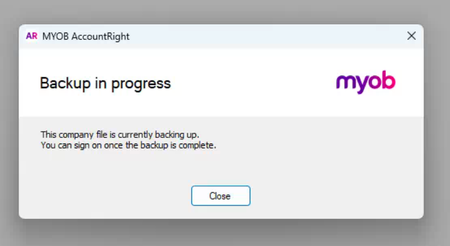
Our MYOB Desktop app is stuck in backup mode (screenshot attached). Please reset our access 🙏 TIAs I raised a Ticket on Tuesday and still no response as well as trying on the phone (still on hold for the second time, 26 minutes and counting...). Case ID = 03146584 I see other requests here and it appears support needs to do to reset the access.SolvedLooking for a serial number - Accountright Premier
Hi, I am looking to get a serial number, so we can do our due diligence on the company we are purhasing. If this needs to be paid, so be it. I need to be able to import CSV's into Accountright Premier. I have been on the phone for an hour and 20 minuites so far with no answer. Please come back to me as soon as you can. Regards, JulianSolved208Views0likes4Comments