Forum Discussion

donna-r's avatar
donna-r
Contributing User
2 months ago

Error -25: Invalid amount when importing invoices

Hi there!

I am seeking some guidance regarding this error that I am getting when importing our inv CSV file. 

Some are importing fine but others I am getting 'Error -25: Invalid amount.' and I can't figure out why.
I've attached the notebook version of the file I am importing and have included a screenshot of the error report below.
I am stumped as to why it is only applicable to some lines and not all???
Thank you in advance :)


4 Replies

  • Mike_James's avatar
    Mike_James
    Ultimate Cover User
    2 months ago

    Hi donna-r​ , a few things to consider:

    • if the import file is formatted for current AccountRight program, then you need curly braces on line 1 ( like {}, on their own).
    • Put the fields in your import file in the same order as per the list of fields required.
      See Import and export fields. Different field orders have been known to cause this error and others.
    • The import file requires a tax amount field, not just a tax code field.
    • If your preferences include items on time billing invoices, then you may need to include Freight tax code and Freight tax amount fields
  • Earl_HD's avatar
    Earl_HD
    MYOB Moderator
    2 months ago

    Hi donna-r​,

    Appreciate for providing the screenshots. This would need further assistance on the backend, make sure to reach out to our team directly. You can reach them on Live Chat via our virtual assistant, MOCA or by submitting a support case via MyAccount.

    Regards,
    Earl

  • donna-r's avatar
    donna-r
    Contributing User
    2 months ago

    Thank you Earl however that doesn't appear to be the problem.

    I have removed any and all quotation marks no matter where they were, also any commas and unnecessary spaces and I am still getting the same error.

    I have attached the file I am using and the error log for you to review please.

    Any assistance will be greatly appreciated, this is doing my head in!!

  • Earl_HD's avatar
    Earl_HD
    MYOB Moderator
    2 months ago

    Hi donna-r,

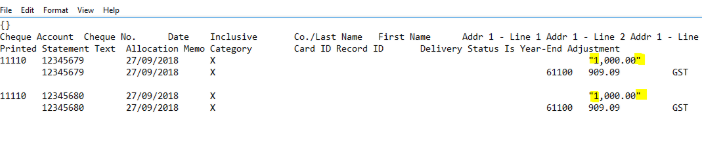
    Thanks for providing the screenshots. This error occurs because Microsoft Excel adds double quotation marks to values when you save as a text file (Tab Delimited) or CSV, especially when a value contains a comma.
     

    Before importing again, remove the quotation marks or change the column format in Excel so the values are saved without them; then re‑save and import the file. There are several ways to do this, the simplest is to adjust the column format in Excel and re‑save.

    Please see image attached: 

    Before.


    After.


    I hope this helps!

    Regards,
    Earl