Forum Discussion

16 Replies
 MMAU7 months agoTrusted Cover User
Please escalate. It's an issue. Bank Transactions and Reconcile Accounts can no longer be accessed. I fear it's happening to people who opted into the beta of AI matching of transactions. Please escalate this to your developers, they need to fix the backend of this ASAP.
- Earl_HD7 months agoMYOB Moderator
Hi Yolande1,
Thanks for providing the error, super helpful! This error can occur when there is a large number of unreconciled bank transactions sitting in the background.
To load more transactions to reconcile, you must add the month, day, and year to the URL for the relevant period you're trying to reconcile. In the browser address bar, at the end of the URL, add: ?bankBalanceDate=MM%2FDD%2FYYYY
For example, for 31 March 2026:
...?bankBalanceDate=03%2F31%2F2026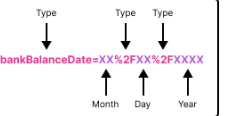
If the error persists after doing the solution provided above, make sure to reach out to our support team directly. You can reach our Live Chat team via our virtual assistant, MOCA or by submitting a support case via MyAccount.
Regards,
Earl - MMAU7 months agoTrusted Cover User
Issue persists. For us as well.
- MMAU7 months agoTrusted Cover User
Screenshot of error attached. Has nothing to do with transactions. You simply cannot even enter the area to start reconciling.
 Genreve_S7 months agoMYOB Moderator
Hi everyone,
Thanks for sending another screenshot and describing the issue further. I’ve had a look, and there’s no widespread issue showing for that error at the moment.
The best next step is to get our support team to take a closer look at your file and what’s going on behind the scenes. You can either lodge a support request via My Account or jump onto MOCA, our virtual assistant, and get connected to the live chat team.
Regards,
Genreve- MMAU7 months agoTrusted Cover User
Work around is to enter Banking Hub area and then click Categorise Transactions in order to reconcile accounts etc.
 ECBBS6 months agoMember
Have the same error message [Something went wrong] when trying to create Invoices... Error has been happening for the last week now. Screenshot included.
- Princess_R6 months agoMYOB Moderator
Hi ECBBS,
Thanks for sending the screenshot through. A week is definitely a long time to have to put up with this. If you’re getting that "Something went wrong" error when creating new invoices, one thing you can try is shortening the text in the description field to see if that clears things up. If that doesn’t do the trick, you can still work around it by clicking into each tax field and confirming it.
If it’s still not working after that, the best next step is to reach out to our team via live chat through our virtual assistant MOCA, or log a support ticket via My Account. Someone from the team will jump in and help you get back up and running as soon as possible.
Cheers,
Princess
 Robert_6 months agoExperienced User
Hi Princess
This issue is endemic across all MYOB applications. I haven't been able to see Purchasing Bills screen enquiries for the last 6 months (last major upgrade?) same issue "something went wrong"
Like your very resourceful and loyal users above I use a workaround to manage this..its not very efficient don't you think?
It's not very professional to offers tweaks and workarounds to help get around a major problem with your company's inability to solve this for the whole MYOB community across every application and also the default message to log problems with a support ticket when it's all too hard
To be frank this is not far behind a "denial of service" attack but in this case the enemy is within
Regards from a very frustrated user
- MMAU6 months agoTrusted Cover User
Our support ticket has gone unanswered for almost a month regarding this issue. Terrible service from MYOB.


Looking for something else?
Search the Community Forum for answers or find your topic and get the conversation started!
Learn, solve, grow
Level up your skills and find answers across all MYOB products


