Forum Discussion

NTTilt's avatar
NTTilt
Experienced User
12 days ago
Solved

Super payments

Hi,

Just looking at create super payments and (although I'm not ready to use it yet) it's only showing me one of my employees super funds. Not all of them. How do I fix this?


TIA

  • Hi Princess

    Thankyou that worked perfectly, all appearing now in paysuper.

    Cheers

4 Replies

  • Doreen_P's avatar
    Doreen_P
    MYOB Moderator
    11 days ago

    Hi NTTilt,


    If some employees are mysteriously missing when you go to create a super payment, it usually means their fund isn’t set to use Pay Super yet. For a quick check, go to:


    • Open the employee’s card
    • Go to the Superannuation tab
    • Click their super fund line
    • Tick Pay using Pay Super
    • Save, then repeat for any other missing employees
    • Head back to Create super payment and refresh so everyone eligible shows up in the list

    If you still can't see other employees in the Create super payment window, you can reach out to our team so they can what's causing this. You can contact them on Live Chat via our virtual assistant, MOCA, or by submitting a support case via My Account.


    Cheers,

    Doreen

  • NTTilt's avatar
    NTTilt
    Experienced User
    11 days ago

    Thanks Doreen,


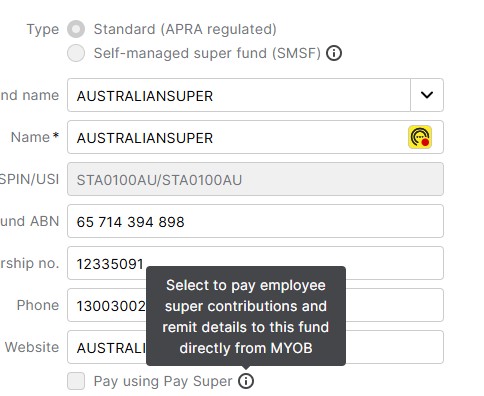
    I've attached a screen shot, the box is greyed out?

  • Princess_R's avatar
    Princess_R
    MYOB Moderator
    11 days ago

    Hi NTTilt,


    Thanks for the screenshot. That greyed-out box usually pops up when you’re editing an existing super fund. To get that Pay using Pay Super tick box active, you’ll want to create a fresh new super fund instead. Here’s a post that walks through all the steps for creating a new super fund – follow that guide and you’ll be all set.


    Cheers,

    Princess

  • NTTilt's avatar
    NTTilt
    Experienced User
    11 days ago

    Hi Princess

    Thankyou that worked perfectly, all appearing now in paysuper.

    Cheers

Looking for something else?

Search the Community Forum for answers or find your topic and get the conversation started!

Community home

Level up your skills using MYOB software.


Find help guides and technical solutions for all MYOB products here

Explore video tutorials for our software at the MYOB Academy here


Dig into MYOB Academy for free courses, learning paths and live events to help build your business with MYOB.