Forum Discussion

8 Replies
- Princess_R10 months agoMYOB Moderator
Hi JLX,
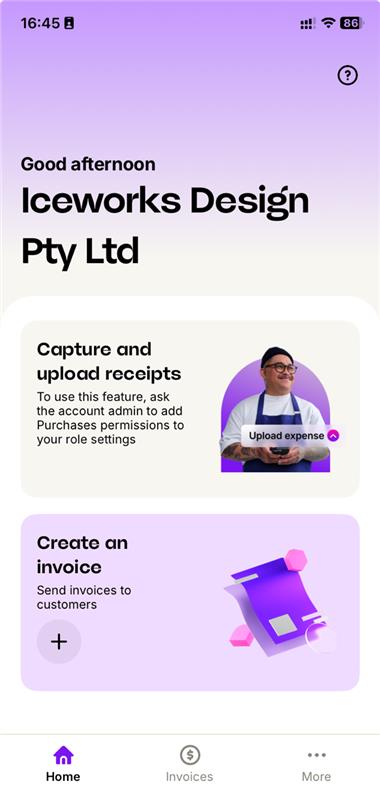
Thanks for checking in! If the Receipt Capture option isn’t showing in the app, it’s usually related to a user permissions. If everything looks right and it’s still not appearing, please create a support ticket via My Account so we can take a closer look.
Cheers,
Princess
 JLX10 months agoContributing Cover User
Hi wondering if there was any feedback as to why the receipt capture function isnt available to users in the APP as per above.
- JLX10 months agoContributing Cover User
Hi, Switching sales on gives them access to create an invoice etc, which they dont need, But there is no purchases access. Dont want to get lost in a virtual assistant loop of one thousand questions so would appreciate feedback re this issue here.
- Shella_A10 months agoMYOB Moderator
Hi JLX,
Thanks for the screenshot, super helpful. From the looks, they’ll need Sales ticked in their access as well to use Receipt capture. After ticking that, have them sign out and back in, then try capturing again. If they’re still unable to access it, give our team a buzz via our virtual assistant MOCA or pop a support ticket through My Account and we’ll sort it out quickly smart.
Cheers,Shella
- JLX10 months agoContributing Cover User
Thanks. Confirming the following is the access set up for the user and they are logging in using their email. They are getting into the app but are unable to capture receipts.
 Genreve_S10 months agoMYOB Moderator
Hi JLX,
Thanks for sharing about your staff login issues. Switching from the regular Capture app to the MYOB Assist app can have a few teething issues. The app uses the permissions tied to the email address you sign in with.
To get your team up and running, make sure:
- Each user has the minimum access they need in your file’s user access. Purchases are enabled with Create & edit access (read‑only will block uploads).
- The app is updated to the latest version.
- Each user signs in with the email address that has access to the file.
Making sure those are on your checklist will generally prevent all issues in logging in and using uploads.
Regards,
Genreve
- JLX10 months agoContributing Cover User
Thanks Doreen. We have put the MYOB Assist App onto the devices for the staff that were previously using capture. They are set up in the same was as they were previously as "File Users" with access to purchasing section so they could log receipts etc but MYOB Assist will not let them log in. Could you let me know if there are any changes we need to make to their access set up so the app will function. Thanks
- Doreen_P10 months agoMYOB Moderator
Hey JLX,
Totally hear you on how valuable Capture app is for quick receipt snaps. On the multiple licences bit, I’m not sure how your current setup is configured, because the MYOB Capture app doesn’t require extra app licences. If you’re using a third‑party app for receipt capture, they might charge per user, so it’s worth asking the provider if they offer a single licence. The MYOB Capture app will be retired at the end of November 2025 in Australia and the new MYOB Assist app is the replacement for Capture and Invoices. It lets your team snap receipts to the In Tray at no extra cost.
Cheers,
Doreen


Looking for something else?
Search the Community Forum for answers or find your topic and get the conversation started!
Learn, solve, grow
Level up your skills and find answers across all MYOB products