Assist not uploading captured items to my account
I have uploaded receipts in the past without a problem with the new assist nothing uploads, have tried the email forwarding no success. Have uploaded new app still nothing, there is no prompt to transfer uploaded only a note asking if there are any more uploads to be added. I have signed into the account but there seems to be e prompt missing to actually upload the captured receipt54Views1like2Comments
Incorrect Due Date Displayed on COD Supplier Bills
Hi, I've recently noticed what appears to be an issue with the due date being assigned to supplier bills. We received and uploaded a supplier invoice with: Invoice Date: 04/09/2026 Payment Terms/Due Date: C.O.D. However, after the bill was created in MYOB, the Bills List screen displayed a due date of 04/10/2026, effectively treating the invoice as being due 30 days from the invoice date. Because the bill appeared as not yet due, it remained unpaid. We only became aware of the issue when the supplier contacted us to follow up on payment. Could you please advise: Is this a known issue? Are there any settings within MYOB that could cause a COD invoice to be assigned a due date one month from the invoice date? Is there a way to ensure uploaded supplier invoices with COD terms default to the invoice date as the due date? I look forward to your advice. Thanks...MichelleV19 file will not open
Hi MYOB, I am trying to upgrade a client's V19 file to ARL. The Account Manager gave me the serial number, and the subscription is paid. MYOB have sent me the instructions below, telling me to open the file. The V19 file will not open. Last time, I was instructed to upload the V19 file via a link. How do I get this resolved? Thanks for Confirming that you have accepted the quote, and I can confirm that the new ARL Plus serail number has been generated To upgrade the AR Basics file, please see below the next steps: Next Steps: please follow the steps below to put the required desktop V19 / Offline files to ARL Hybrid updated to the latest version . Open the Current file and serail number on your Desktop-containing the V19 file or older file. Open the old AccountRight CDF file Click help on the top right. Click Change Serial Number Enter the new serial number and will take 3-5 mins to update New ARL Plus Serail number XXXXSolved
User Access
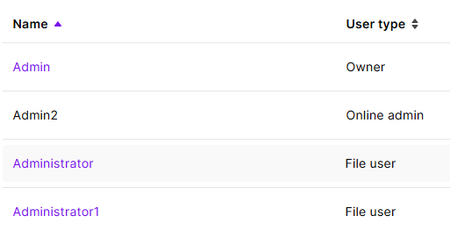
Hi, We generally use AR, however I use the online portal too. We have just migrated to a new email address, and when we started doing it instead of changing my email for my login I created a new user. I have now got my email up and running, however I made the other user inactive as it didn't do what I needed it to, and now it has gone black and I cannot access it. It still has my new email address on it and I cannot get into it to remove, which means I cannot add my email address to my current profile as it thinks there is a duplicate. I currently use the "Admin" login as the files owner, and the "Admin2" is the one that I'm trying to delete. Please see screenshot below, the text is black and I cannot get into it. In our AR software this user is not there anywhere, only on our online profile. Is there someone within MYOB that can access it, or am I now stuck with an email address that I cannot use. Our current email that is attached to MYOB will be being closed once we have let the forwarding work for awhile and everyone has our new email. Many Thanks, Sharyn135Views0likes6Comments
Emailed invoices not showing on page - red line
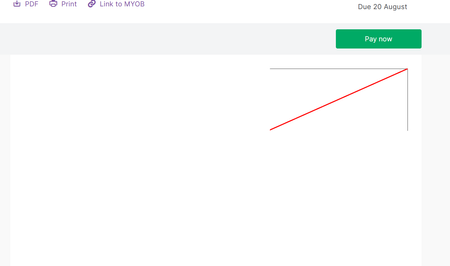
Today I have had a customer reply to my invoice email that when you click on the View Full Invoice Details button in the email it takes you to the invoice in browser but the invoice isnt displayed, it just shows a cut off red line. See screenshot. I try opening and get the same issue from the email.171Views0likes4CommentsTPAR
Hello trying to access TPAR Report -using reporting, TPAR that opens ok showing list of subcontractors all ok but when i click on the green create Taxable payments file nothing happens, is there a setting that i need to change or what please help rather important to resolve this also i have jsut called the support number but theres a 2 hour wait on the phone151Views0likes3Comments
MYOB Payday Super - Mobile phone verification
I have set up payday super through myob this morning instead of our normal industry super clearing house. It is not letting me verify the account due to the follwoing Error. "You need to verify your mobile number before you can authorise payments. Please check the email we sent you for information on how to do this." I have checked my email three times, double checked the spam and also checked every folder and my mobile number.Its not there and all details are correct. I am the only user of the account I am set as Pay Super Administrator Help would be appreciated. Thanks CindySolved207Views0likes1Comment
Client Complaint re Unpaid Invoices
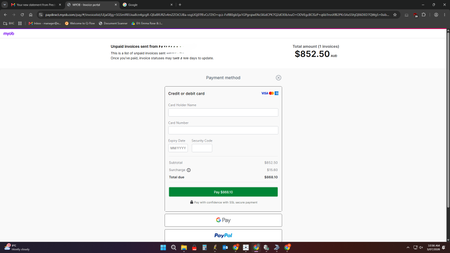
My client was complaining that the Unpaid Invoices Summary she received did not contain the pdf of the Statement or Invoice. She is the manager and has to approve and forward the pdf to her accounts person. So it didn't save me any time as I still had to physically email her what she was requesting. Can that feature be incorporated into the Summary? This is the screenshot she sent me. (They had changed their email address, so had not received previous invoices or Statement.) ThanksSolved138Views0likes2CommentsNo bank account number shows on Statements
Is there a way to have my bank account number on my statements? I have had a look at the templates and cant see a way to add it (Browser). More than once I have been told there is no bank account number. The number is on the invoice I send out, but if I am sending out a separate statement at the end of month, some people will just receive that and want to pay online via internet banking.Unable to process pays - 3 hours and hung up on when calling
I completed the final pay on Friday for the year and lodged the STP, which was accepted. I can't process the first pay for this year, I've tried both browser and desktop, and neither will process. Browser gets get the red time out error message and the desktop just does $0 value with no transaction created. I've tried to call the support number and after 3 hours waiting on hold, I heard "you have 10 seconds" and then I was hung up on. I've tried putting in later periods and later payment dates and still nothing. I need to be processing this today155Views0likes3Comments