Forum Discussion

JackieW's avatar
JackieW
Trusted Cover User
1 month ago
Solved

Log in issue

I am trying to log in to my desktop Accountright and I am receiving an error message.  Refer to the attached photo.

i have tried running Task Manager and it keeps cycling, I also tried a forced shut down.  
 

  • Hi JackieW,

    Appreciate for sharing the screenshot, super helpful! Script errors are typically caused by data that has been cached within the browser. To avoid these, you'll need to Clear the browsing data by going into Control Panel and Selecting Internet Options; 

    > Then under Browsing History  select delete
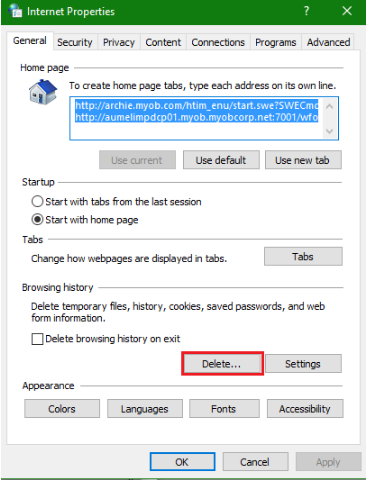
     

    > Then select the options displayed (attached) and click delete.
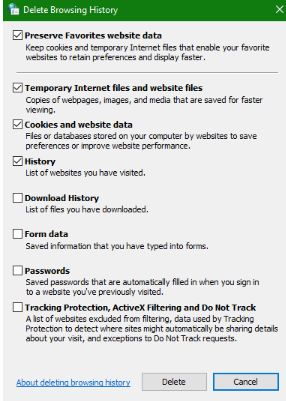
     

    I hope this helps!

    Regards,
    Earl

6 Replies

  • JackieW's avatar
    JackieW
    Trusted Cover User
    1 month ago

    Task Manager finally shut it down and I was able to log in as usual - frustrating

  • Earl_HD's avatar
    Earl_HD
    MYOB Moderator
    1 month ago

    Hi JackieW,

    Appreciate for sharing the screenshot, super helpful! Script errors are typically caused by data that has been cached within the browser. To avoid these, you'll need to Clear the browsing data by going into Control Panel and Selecting Internet Options; 

    > Then under Browsing History  select delete


    > Then select the options displayed (attached) and click delete.


    I hope this helps!

    Regards,
    Earl

  • JackieW's avatar
    JackieW
    Trusted Cover User
    15 days ago

    I am having the same issue again.  Why has it occurred again after 1 month. Never happened in the previous years of using MYOB AccountRight.

  • Doreen_P's avatar
    Doreen_P
    MYOB Moderator
    14 days ago

    Hi JackieW,


    Sorry to hear you’re running into this script error again, especially after things were working fine for so long. Script errors like this usually pop up because the computer’s still trying to use Internet Explorer 11, which has been permanently disabled by a Microsoft Edge update on certain versions of Windows 10. That clash between older tech and newer updates can cause exactly the kind of behaviour you’re seeing, which is also why some users are affected while others aren’t. If your business has an IT team, we strongly recommend checking in with them before making any changes.


    Cheers,

    Doreen

Looking for something else?

Search the Community Forum for answers or find your topic and get the conversation started!

Community home

Level up your skills using MYOB software.


Find help guides and technical solutions for all MYOB products here

Explore video tutorials for our software at the MYOB Academy here


Dig into MYOB Academy for free courses, learning paths and live events to help build your business with MYOB.