Featured Content

Featured
MYOB Assist
Find answers for MYOB Assist – the mobile companion app that works with MYOB Business and AccountRight.2 days ago85 Posts MYOB Team
2 days ago182 Posts MYOB Capture & Invoicing apps
16 days ago49 Posts


Featured Content
Important updates for MYOB Invoice and MYOB Capture apps 17/09/2025 *Australian Customers
Hi everyone, With the exciting launch of the new MYOB Assist app in Australia, this means there will be some changes to the availability of the MYOB Invoice and MYOB Capture apps. For custom...446Views0likes5Comments


Add a timesheet not start a shift
I have selected the Time option in the mobile app as I want to add a timesheet. According to the online instructions there should be a + button to tap to add a timesheet, but the only option available is to start a shift. Payroll Settings in the online file are to track times using Timesheets. Is there another setting to be able to add a timesheet in the app rather than start and end a shift?24Views0likes1CommentImportant updates for MYOB Invoice and MYOB Capture apps 17/09/2025 *Australian Customers
Hi everyone, With the exciting launch of the new MYOB Assist app in Australia, this means there will be some changes to the availability of the MYOB Invoice and MYOB Capture apps. For customers in New Zealand - there is no change to these apps or their availability. For Australian customers, please see the below. The MYOB Invoice and MYOB Capture apps are no longer available for download as of the 16th September when the MYOB Assist app was launched. On 29 September 2026, MYOB will retire the MYOB Capture and MYOB Invoice apps in Australia. Click the link to learn more about MYOB Assist446Views0likes5CommentsKeep quotes moving and invoice faster with the latest MYOB Assist update!
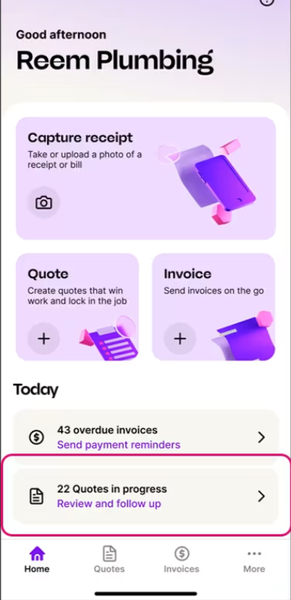
Hi everyone, If you use MYOB Assist on the go, there are a couple of handy updates worth knowing about. Know where your quotes are at The new Quotes in Progress tile gives you a quick view of outstanding quotes, so you can see what needs attention without digging around. Follow up sooner, send quotes out, convert them to invoices, or update their status on the spot. Faster invoicing, with fewer surprises We’ve also made invoicing simpler in MYOB Assist. You can now add multiple items in one go, so creating an invoice takes less tapping and back and forth. How to get these updates To access these features, update your MYOB Assist app to the latest version.97Views0likes4Comments
Myob Teams Invite Expired
I've added my staff to the teams app and sent them invites. They each received 2 emails one for the app, and the other inviting them to the team with a link. A couple of them didn't action the email and the links have expired. I cannot find anywhere how to re-new the link. If I delete and re-add them they receive 1 email and it does not have a link.158Views0likes4Comments
MYOB Teams App not showing submitted timesheet
I have an employee that is having issues with their MYOB Teams App. When they submit their timesheets it does not show their history and therefore they do not know whether or not their timesheet has been submitted. As the employer we can see the submitted timesheets. As they cannot confirm whether the timesheets have been submitted we are having trouble with timesheets being submitted more that once. They are a long time user of the app and have logged on and off. Removed app and reinstalled it and are still having issues.1.1KViews3likes28Comments
Capture
A staff member has just purchased a new phone - she is now locked out of Capture to record receipts. The advice online is that MYOB is phasing out Capture to be replaced with MYOB Assist. There is no MYOB Assist app available in the App Store - I believe it is just for Australian users at this stage. She has deleted the Capture app and when she tries to reinstall it it says "This version is not valid anymore - please update to latest version". There is no latest version! Please advise - I have no problem reinstalling the app or signing out and in again. Why is she having this problem? (She has a Samsung S25 - I have Iphone)Solved193Views0likes11Comments
Sign in process for Assist app
The sign in process is ridiculous. I used to be able to bring up the app, quickly scan my receipt and be on my way. Now I need to sign in every single time I open the app. Plus the email verification, which annoys me anyway, but I need to do everytime. The time it takes me to sign in is longer than scanning the receipt. Will there be an update to keep the app signed in on each device?Solved230Views2likes5Comments
MYOB Assist app - stay logged in and no invoicing
Hi We've been using the MYOB Capture app for our purposes over a number of years, and it has worked perfectly for our requirements. We have about 10 staff members, that use the company credit card for fuel purchases etc, and scan the receipts to get them into MYOB. This system has worked really well. There are a few problems with the Assist app and I need to know how to get around them, or I'll be going elsewhere. Can the Assist app stay logged in. I can't expect the tradies to keep logging into their app, and re-authenticating each time they wish to scan a fuel receipt Can the invoicing function in the Assist app be turned off? I don't need invoicing in this format, nor do I need staff members to see what has been invoiced and for how much. Please advise if there is a work around, a third party scanning ability or I just have to go somewhere else (4 companies)Solved304Views1like5CommentsRecording billable hours in MYOB business lite.
I was told by the chat that you can record your worked hours against customer contacts as a sole trader in the invoicing section of the MYOB assist app without having to upgrade to payroll, team or accumatica. i cannot seem to find this application anywhere?34Views0likes1CommentMYOB Team login problem
Hi, My staff are continuing to have issues trying to login to MYOB Teams to enter their timesheets. They are told to reset their passwords which they do, it works for a day or two then crashes again and they have to reset password & PIN. Are there any fixes on the way from the software update that has casues this?269Views1like5CommentsInputing leave in Teams app
Hi, I have an employee trying to input leave into the app. They work Monday to Friday and they are attempting to input 5 days leave. Start date is 3/8/2026, end date to be Friday 7/8/2026. If they input 3/8 to 7/8 it shows as 6 days leave. If they input the correct dates covering Monday 3/8 to Friday 7/8 it shows their leave as 6 days and not 5. How can we fix this? Also is there a way for the authorizer to correct leave requests rather than having to cancel them and get the staff member to input then again?66Views0likes1Comment