Featured Content

Featured
MYOB Assist
Find answers for MYOB Assist – the mobile companion app that works with MYOB Business and AccountRight.2 days ago85 Posts MYOB Team
2 days ago182 Posts MYOB Capture & Invoicing apps
16 days ago49 Posts


Featured Content
Important updates for MYOB Invoice and MYOB Capture apps 17/09/2025 *Australian Customers
Hi everyone, With the exciting launch of the new MYOB Assist app in Australia, this means there will be some changes to the availability of the MYOB Invoice and MYOB Capture apps. For custom...446Views0likes5Comments


Add a timesheet not start a shift
I have selected the Time option in the mobile app as I want to add a timesheet. According to the online instructions there should be a + button to tap to add a timesheet, but the only option available is to start a shift. Payroll Settings in the online file are to track times using Timesheets. Is there another setting to be able to add a timesheet in the app rather than start and end a shift?24Views0likes1CommentImportant updates for MYOB Invoice and MYOB Capture apps 17/09/2025 *Australian Customers
Hi everyone, With the exciting launch of the new MYOB Assist app in Australia, this means there will be some changes to the availability of the MYOB Invoice and MYOB Capture apps. For customers in New Zealand - there is no change to these apps or their availability. For Australian customers, please see the below. The MYOB Invoice and MYOB Capture apps are no longer available for download as of the 16th September when the MYOB Assist app was launched. On 29 September 2026, MYOB will retire the MYOB Capture and MYOB Invoice apps in Australia. Click the link to learn more about MYOB Assist446Views0likes5CommentsKeep quotes moving and invoice faster with the latest MYOB Assist update!
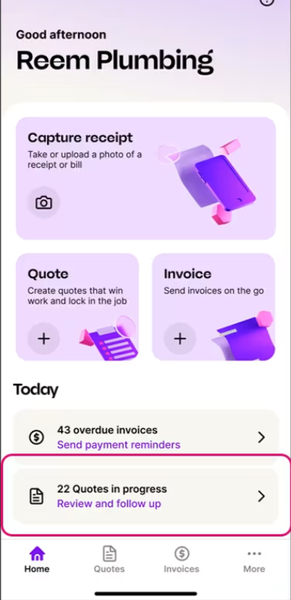
Hi everyone, If you use MYOB Assist on the go, there are a couple of handy updates worth knowing about. Know where your quotes are at The new Quotes in Progress tile gives you a quick view of outstanding quotes, so you can see what needs attention without digging around. Follow up sooner, send quotes out, convert them to invoices, or update their status on the spot. Faster invoicing, with fewer surprises We’ve also made invoicing simpler in MYOB Assist. You can now add multiple items in one go, so creating an invoice takes less tapping and back and forth. How to get these updates To access these features, update your MYOB Assist app to the latest version.97Views0likes4CommentsRecording billable hours in MYOB business lite.
I was told by the chat that you can record your worked hours against customer contacts as a sole trader in the invoicing section of the MYOB assist app without having to upgrade to payroll, team or accumatica. i cannot seem to find this application anywhere?34Views0likes1Comment
Inputing leave in Teams app
Hi, I have an employee trying to input leave into the app. They work Monday to Friday and they are attempting to input 5 days leave. Start date is 3/8/2026, end date to be Friday 7/8/2026. If they input 3/8 to 7/8 it shows as 6 days leave. If they input the correct dates covering Monday 3/8 to Friday 7/8 it shows their leave as 6 days and not 5. How can we fix this? Also is there a way for the authorizer to correct leave requests rather than having to cancel them and get the staff member to input then again?66Views0likes1Comment
MYOB Team
Hi I’ve got your response to setting up an employee for I’ve done that previously but it still doesn’t send the follow up mail to actually login to MYOB. Please pics attached. Please have a look at them and let me know what I’m doing wrong. I would appreciate it. the pic isn’t very clean but hoping you can assist with this pic. let me know. thank you.38Views0likes0CommentsMYOB TEAM
good morning, I need some assistance with MYOB Team I have the MYOB business and wanting to use MYOB Team. I get the email stating that I’ve been invited to join MYOB Team and that there would be a follow up email. However I never get that follow up email and I’ve done it now twice already. What am I doing wrong , please can someone assist me with this as I have a new starter that started yesterday and we need to keep track of time. I would really appreciate it. thanks. ☺️110Views0likes3Comments
MYOB Team login problem
Hi, My staff are continuing to have issues trying to login to MYOB Teams to enter their timesheets. They are told to reset their passwords which they do, it works for a day or two then crashes again and they have to reset password & PIN. Are there any fixes on the way from the software update that has casues this?269Views1like5CommentsMYOB TEAM - GEO LOCATIONS
Hi The Geo Locations is currently not working on MYOB Teams, it is showing all staff members has having their Locations as turned off when they do not. Can this please be looked at as it is important to know that staff are at the location when clocking in and out. Thank you133Views0likes3Comments
Myob Teams Invite Expired
I've added my staff to the teams app and sent them invites. They each received 2 emails one for the app, and the other inviting them to the team with a link. A couple of them didn't action the email and the links have expired. I cannot find anywhere how to re-new the link. If I delete and re-add them they receive 1 email and it does not have a link.158Views0likes4Comments
MYOB Teams Login
My employee has downloaded the Teams app and tried to create an account. It says it's been created but it doesn't ask for a password. Then it says to return to MYOB team, but she hasn't set up a password to be able to login. We've deleted the app and re-downloaded but it hasn't helped.240Views0likes1Comment