Find answers, offer solutions, ask questions


Learn, solve, grow
Level up your skills and find answers across all MYOB products
Featured Places

MYOB Business Ideas Exchange
Add your ideas to improve MYOB Business software and vote on ideas to help us build what is most important to youFeatured Places

MYOB Announcements
The latest news and happenings on the MYOB Community Forum.Featured Places
Incidents & Outages
Check for incidents & outages that may affect your software
Click here to view status page
Featured Content
Hi everyone! We’re seeing more questions about whether super payments are reaching employee funds within the new Payday Super timeframe.
If you’re feeling a bit anxious about that, you’re no...
1.6KViews
0likes
21Comments
Featured Content
Hi there,
The new Payday Super legislation will require employers to pay Superannuation Guarantee (SG) contributions at the same time as salary and wages from 1 July 2026. Contributions must re...
6.1KViews
5likes
60Comments

Not displaying all invoices
Hi I am selecting the Sales Tab, then Invoices and selecting All for this financial year etc. It keeps showing me just the overdue ones. I have clicked on the drop down boxes for each column making sure there are no filters selected that would be causing this and still same result. Help!Solved542Views0likes10Comments
Uploads showing as Scan failed
we are seeing more "scan failed" errors when trying to upload files - when using different computers, (web upload source) and also from mobile (Mobile app source). Occasional we can try the upload again and it goes through OK, but more often it will not. Similar types of uploads that we have been able to upload previously without any issues. This seems to have only started in the past couple of days. Hoping someone might be able to help with this? thanks
BEWARE: Extremely difficult and time wasting to cancel a subscription during the free trial period
When trying to cancel through the portal, the only available path is to call the number, however after multiple calls, a lot of my time wasted on hold and a request for callback I have still not been able to cancel my subscription. You can't even raise a cancellation request via the support form - it just disables the forms and tells you to call the number. This is unnecessarily difficult - if you have the technical means to build accounting software then omitting the ability to cancel a subscription automatically via the portal is by design.599Views2likes17Comments
SMS activity history | SMS invoice history
When we send an invoice by SMS (Share > SMS invoice, or Send SMS ticked in Email invoice), nothing is recorded in the invoice’s Activity history. Emails are logged with the recipient, date and time, but SMS sends leave no trace. That means we have no record of SMS contact with a customer, which we need for debt collection, disputes and internal audits. Staff currently have to add manual notes to every invoice. Please log SMS sends in Activity history the same way as emails: the mobile number, date, time and user who sent it, plus delivery status if possible. It would also help to show SMS contact on the customer’s contact record.3Views0likes0Comments
Refunding Online Payment Link
Desperatly hoping someone has a reasonable solution to this issue. A customer has paid using the MYOB Online Payment Link. We now have to refund the invoice. MYOB information states to Contact Support, but the drop down boxes do not cover refunds via the Online Payment Link. We then went to the chat box and they sent us in a circle to the link to contact support. Finally we were given a phone number to contact. Once we give the Invoice number and date details we are told that we cannot refund the full amount as the transaction fees cannot be refunded. How do we refund the full amount? You could direct deposit the amount is the reply from the person on the phone. That goes against the terms & conditions on the FAQ's cut & pasted below. Refunds for online payments should only be provided to a cardholder if it's a genuine refund for a sale. The refund must be processed to the same card used in the original sale, and must be in the form of a credit and not via cash or cheque (as per the Online Payments Terms and Conditions). To process a refund, contact our payments team by submitting a support request via My Account (log in at myaccount.myob.com and click Contact support). Does anyone know how to refund the full amount to the customer? We are feeling very frustrated at the amount of time spent running in circles with no real solution that we can see. What are we missing? Thank you.Allow staff to capture receipts but not access any information
Basically give us back exactly what we had-allow our staff to upload receipts but do nothing else. I don’t want them to access quotes or invoices or customer info-just capture receipts and send them to me. I am incredibly frustrated that this has been removed-it doesn’t take a rocket scientist to work out that this is what a lot of users want, particularly tradies. Our staff are not involved in the accounting side of our business at all-and all the tradies I know are the same. We just want an easy efficient way to get the receipts sent through…….exactly what we had with myob capture.10Views1like0Comments
Aged receivables report (desktop version - Also have the Webb=same
Aged receivable dated 30/06/2025 $12 K report dated Nov 25 Today difference 30/06/2025 WHY? Because MYOB support says the AR is as at the day the report was done not the date you want it . It is not locked. ONLY balance sheet is correct. Check aged payable Mon Wed & Fri same date 30/06/2025 and see the balance is different every time Why would I date 30/06/2025 and get the day the report is generated. Reports are for fun for MYOB not for tax or accuracy. Looks like you need to cross check all reports GL, Balance sheet ,aged payroll etc to make sure they balance before you draft or lodge. Or just do cash clients only. Accrual are so inaccurate Like with square not matching sales and now clients do there own MYOB it is worse, square sales go to income so accrual takes the sale then the sales invoice. PAYG monthly should also be separate from GST quarterly. Explain to clients your Oct PAYG is due beforte your Sept PAYG as it is in with theGST No one is safe today ATO or MYOB14Views0likes1CommentMYOB has errors & sees a file sweep
Desktop AR shows balance 30/06/2025 as $12K printed 17/11/2025 for accountants & AGM and recorded The Web based MYOB shows $6.5K as at 30/06/2025 Sales reports are not matching to invoices Statements only show what is owed even when change the date Cross check of everything I have looked into so far is not matching WAY too many erros Need MYOB person not MOCO help to fix And please no more lets change the serial number who has the answer to who would be best to solve this. So far both the accountant (not connected to my practice) & myself look incompetant Sue17Views0likes1Comment
STP not sent for payruns in previous FY
Hi, I would really appreciate some help on this topic. I have processed all the payrun for the 2025/2026 FY. However, all of these payruns have STP "not sent". I think I set up on the STP in MYOB after I had processed these payruns. How can I file STP on these payruns as I need to finalise the EOY STP for 2025/2026 and this keeps coming up as NIL as the payruns STP needs to be filed first. Thank you for your help :)32Views0likes3Comments
Previous reconciliation out: MYOB error
Hello We were forced onto MYOB Business Pro July this year. I have always reconciled all bank accounts (manually, no bank feed). Yesterday, the main account was out. I checked all previous bank reconciliations back to July and they are all out by the same amount. I went into bank reconciliation reports and found my second reconciliation, dated 7 July 2026. I noticed that this reconciliation included a transaction dated 25 September 2026 in Outstanding deposits. How is this even possible? I'm guessing this and another wrongful transaction have messed up my reconciliation. (Screenprint is attached) I've kept all previous bank reconciliation print-outs. My previous reconciliation (7 July) matches the bank statement, the report of the 7 July reconciliation accessed yesterday, does not. I don't understand how this is possible. Can someone please investigate this and how do I go about requesting this? Thank you.24Views0likes2CommentsInvoice not showing om statement
I have 2 unpaid invoices that have not been paid and are now due. I have printed off a statement, with the correct date range, and only one of the invoices is showing. I also had a quick look under receive payments for this customer, and that same invoice does not come up. I am at a loss on how to make it appear on their statement
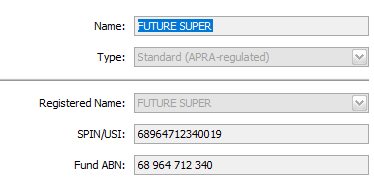
MYOB Super fund not in list
Hi there, I am trying to process a new employees super, but am receiving an error that the super fund doesn't accept payments anymore. I looked up the new details, but these details are not on the list of super funds to choose from in the list on MYOB. How can I add the new details? The current details I have are: The new details are:28Views0likes1CommentNo CONTACT
HI, I lodged a Case #03363230 back on the 29th of September, to date I have had no contact from MYOB, I have replied to the email from MYOB, multiple times, with no responses. Is this not a service that is provided anymore? Surely, it cannot take 3 weeks for a response. Can someone please respond?52Views0likes2Comments
HELP! MYOB Business Online subscription
Hi all, we just got our MYOB Business Online suspended and an email that we need to pay $1485. But we've been paying monthly $78. We use Myob Business Online, have Payroll (22 staff) and unlimited Inventory. Does anyone know why we would be owing $1485...sent on a do-not-reply email and only option is a payment button with no contact info. But our MYOB staff cannot use the system - read only. I'm stumped about how that amount arose as it doesn't match any quoted payment plans. Any info gratefully received. Thanks.Unsolicited survey on invoices
MYOB is displaying an unsolicited “How do you like to pay?” survey above our customer invoices. We have not authorised this promotional content and want it permanently removed from our online invoices. Please advise how to opt out. Yet again, something that has been forced through without an opt in option, and we do not find out until confused customers come to us asking questions.Car Purchase- MYOB Business
We recently put $35k down on a company car purchase. I had to transfer the deposit to the business account. So I currently have a $35k transfer in and a $35k payment out to the car dealership in my bank feed. I currently have a motor vehicle asset and expense account set up, but I haven't had to use them before, so I want to make sure I put everything in the right place! I have set up a loan before, so I think I can sort out the financed portion of the purchase. Thank you!
Duplicate transactions appearing during reconciliation
Hi all, I am having trouble with duplicate transactions appearing during bank reconciliation, I always try to apply bank feeds correctly to the bills and accounts. For instance, all the bank transfer transactions have different numbers everytime and I always match the two transfers with their numbers, still the reconciliation sheet showing duplicate transactions for the same number. Should I just ignore that and delete them or whether their is a better solution for future?31Views0likes1CommentBalance Sheet out of balance case # 03257179
This case has been going back and forth for two months and is not resolved. The balance sheet account for Retained Earnings is out of balance as at 01/07/2023 by $9,090.90. I keep being asked to do things which I do and nothing fixes it. It needs fixing by MYOB but I can't seem to get this done - just keep getting another email asking repeated questions that I continue to answer. It is maddening and I have asked for it to be escalated several times without success. It is out of balance. MYOB please fix it because my client and I are not programmers. Regards LizSolved132Views0likes5Comments