Latest topics
Offline mode changes 17/06/2026 – we’re improving how you can navigate this change
4 MIN READ Hi everyone, There has been a lot of discussion about the Offline mode change to AccountRight which comes into effect with the next version release (2026.5) on 17/06/2026. TL;DR - from Ju...1.3KViews2likes42Comments


Subject: Login loop when accessing MYOB overseas — Case #03225045
Hi, I'm currently overseas and unable to access MYOB — I'm caught in an endless loop that keeps requesting my login credentials, even after entering them correctly. I've already logged a case for this (#03225045) but haven't had a resolution yet. Could someone from the MYOB team please look into this or advise on a workaround? I need access urgently while traveling. Thanks, William Healy5Views0likes0Comments
not fit for purpose
i am writing to lodge a formal complaint regarding a severe and ongoing technical restriction with my MYOB accountright premier subscriptions, i currently pay in excess of $5000 annually for 2 entirely seperate subscriptions, each assigned to seperate email logins Under the Australian Consumer Law (ACL), services must be provided with due care and skill, and must be reasonably fit for the specified purpose. As a premium, high-tier subscriber running a multi-entity operation, the software is currently failing to meet these statutory guarantees requesting help falls on deaf ears to avoid escalation of this to ACCC i require Excecutive technical support to assist with this to allow both licenses to run side by side - i require a senior manager to contact me within 5 business days to assist with a permanent remeduy. previous help requests are now past months sincerely belinda4Views0likes0CommentsOffline mode changes 17/06/2026 – we’re improving how you can navigate this change
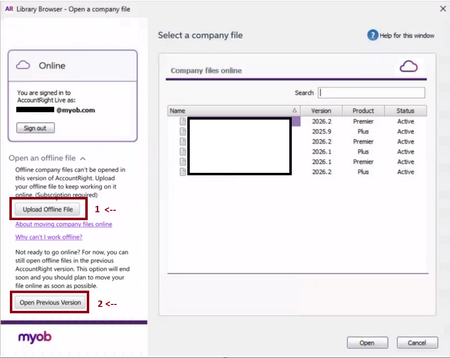
4 MIN READ Hi everyone, There has been a lot of discussion about the Offline mode change to AccountRight which comes into effect with the next version release (2026.5) on 17/06/2026. TL;DR - from June 18th, you can now complete every step of this transition from AccountRight offline to AccountRight online yourself, directly within AccountRight. *NB those choosing to install Server Edition to stay offline are not impacted by these improvements/changes. The process for migrating from AccountRight to MYOB Business Lite/Pro is also unchanged - please refer to this help page for more information on moving to Lite/Pro. We know that call wait times have been much longer than usual, being unable to reach us to get help with this change has not been acceptable, and we’re sorry for that. This update will make the move online even easier with the new ability to self-serve. We’ve heard your feedback and worked hard on improvements in this release to support your file moving online, regardless of whether you already have a subscription or need to purchase one. This means you can navigate the change without needing to call us. These changes will be available after we release 2026.5. Because the release happens in the evening of the 17th, you can plan to do these steps from the morning of the 18th. Here is what will change and how to work through it when you open AccountRight from the 18 th June in version 2026.5. Your ‘Recently opened company file’ list will now only show online files. If you haven’t already moved your file online, then the recently opened company file list will likely be blank > this is expected, see below for how to open them. What to do next: Click on ‘open a company file’ From here, you will now see an updated interface with new information and options available (see image) 1) ‘Upload offline file’ In order to upload an offline file, you’ll need these 3 things need to be true That you are the file owner / online administrator That you have an active subscription available for the file to consume That the file you are uploading is already activated If these 3 things are already in place for you, then you can upload your file and continue working If you cant meet these 3 requirements above, please see the below for activating your file or purchasing a subscription: Have a subscription already, but the offline file is not activated? Then you will receive an error that ‘This company file is not activated’. You will need to open a previous version, as activations can only be done in 2026.4 or earlier. We have made this process easier for you Click the second button highlighted above ‘Open previous version’ Open the company file, then go to Help > Activate your company file Close and re-open AccountRight (this will re-open in 2026.5) Click on ‘upload offline file’ again Don't have a subscription yet? You can now purchase your AccountRight subscription within the product, meaning you won't need to call our Sales team. When you click ‘upload offline file’ and you do not have a subscription, you will be presented with a new message prompting the in product purchase, with the best possible offer that is available to you. On this screen, click ‘Subscribe now’ and you will be moved to a shopping cart where you can complete the purchase of a subscription with your discount offer included. Complete your purchase and you will receive an email with your subscription details including your new serial number.** Once you have the subscription, restart the process of uploading your offline file. **It is important to note that if you purchase a subscription through the process above, or you have recently purchased a subscription, then your new subscription will have a new / different serial number to your current file. When you re-try to upload your file, you will get a warning message that the serial numbers do not match. On this warning message, there will be a link you can click, which takes you through the process step by step on how to update the serial number in your file, before you upload it into your new subscription. *Note that this step must be completed in version 2026.4, which you can easily open using the ‘Open previous version’ button. Our sales and support teams are still available if you need help at any time, but we will likely continue to experience longer call wait times throughout end of financial year. You can see how to get in touch by visiting myob.com/contactus. For your reference, my original post announcing the change to offline mode with FAQs and additional discussions is here. Please leave any questions about these changes on this post which we will be monitoring closely. Regards, Mike/MYOB1.3KViews2likes42Comments
MYOB offline being phased out
I Just received an email regarding the phasing out of the desktop library I’m pretty disgusted that this is happening and having to have all files online and was told this would be happening mid June 2026 - not even the end of a financial year for an accounting program this is pretty pathetic. Was told each file would be $ 35 per file What happens to files that may have an audit and accounts that are needed for a 7 year period not to mention end of year journals for this current financial year. I have been working with this program for 32years & not everyone wants their files online & in the cloud - let alone those who don't need payroll, use bank feeds or all the extra's that are in the program - not to mention those who live rurally with **bleep** internet Very annoyed2.1KViews20likes96Comments
MYOB Backups
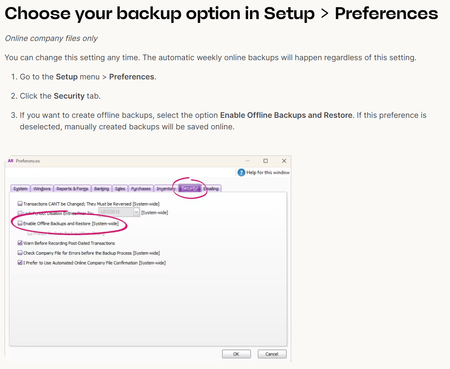
Hi I've noticed that the latest version of MYOB 2026.5 no longer has the facility for a local backup. This is problematic for some of my clients as they want to have their own backups on their local servers. They are paying for their subscription & believe they are entitled to take their own backups. We were able to tick the box the enable local backups & then untick to have MYOB also backing up the file. Where is this option now?1.4KViews25likes65Comments
Offline backups - why have they stopped?
I use AccountRight mostly on desktop with an ONLINE file. Software has automatically updated to 2026.5. The notes on Backing up and restoring still note that there is an option to enable offline backups for ONLINE files. However with the update this option has gone. WHY?? I want to have an offline backup of my MYOB file as a record of a point in time. Especially when BAS is lodged and EOFY. There has been no mention of this option going as part of pushing everyone to have ONLINE files. MYOB please advise ASAP594Views11likes18Comments
Live View of Staff Currently on Shift in MYOB Teams
It would be incredibly valuable to have a live dashboard showing which employees have clocked on and are currently on site. Our business has around 70 staff, and in the event of an emergency evacuation or roll call, we need to be able to quickly identify who has started their shift and should be accounted for. At the moment, MYOB Team records clock-on and clock-off times, but there doesn't appear to be a simple real-time view of everyone currently clocked on. A feature that displayed: Employees currently clocked on Clock-on time Work location (if applicable) Total number of staff currently on site would greatly improve workplace safety and emergency preparedness. This functionality would allow managers and emergency wardens to perform an accurate roll call within seconds during an evacuation or other emergency, rather than manually checking timesheets or relying on paper attendance records. I believe this would be a valuable safety feature for any business using MYOB Team to manage staff attendance.4Views0likes0Comments
Personalise payslips templates on web browser version of AccountRight Plus
Hi, I am wanting to transit to use MYOB browser for everyday accounting. The payslip that I see from browser is different to the one I had on the desktop version. How can I personalise the items on the pay slips in the browser - as that is where I would like to send future pay slips from? Basically we need the "card" info on the pay slips as there are information that the employees need. Please find attached the desktop version of the customised pay slip "form"/ template. Please help, thank you in advance.165Views7likes7Comments
Stopping an authorised super payment
Hi, on 3/7 Our super payments were authorised and paid from MYOB. The payments went to employees super accounts except for 1 employee whose contributions were credited back to our bank account because of missing information. The 2 transactions for the super batches had to be reversed and then processed again leaving out the employee with the missing info. Today after fixing the error in the employees record I processed the 2 transactions again. I noticed that in manage payments it showed the 4 pending transactions-2 were for the super transations already paid to staff and 2 for the employee whose super had been returned. I emailed the super authoriser asking him to authorise only the 2 transactions for this employee. I did tell him not to authorise the other 2 but I think he got confused and authorised them anyway. He called straight away, I spent 2 and a half hours waiting on the phone for MYOB , only to be told that they couldn't do anything and we would need to contact the bank to stop the payment. It was already after 6:00pm so the authoriser will call the bank tomorrow morning to see if he can stop the payments. Currently it doesn't show in the bank at all. Is what MYOB said correct? Is there no way for them to stop the payments? They were authorised this afternoon.6Views0likes0CommentsPayroll Activity Summary + Payroll Register Details not matching
Hi all Finalising STP for a client today and there is a $15 difference in gross wages for one of the employees. The Payroll Register Detail and STP finalisation match but the Payroll Activity Summary does not. I cannot access the employee history in the card file as wages for the 2027 year have already been entered. I've done an update event and the reports haven't changed. I've spent over an hour to fix $15 and I'm now pulling my hair out. Does anyone have any idea how to fix this please? Thanks in advance13Views0likes2CommentsSTP Amendment
We migrated our payroll from MYOB AccountRight to Xero during the 2025–26 financial year. Xero has correctly lodged the full year payroll, including opening YTD balances from MYOB. However, the MYOB STP pay events are still appearing in the ATO, resulting in duplicate income on employee income statements. The MYOB file no longer has an active STP Reporting Centre. When I click Payroll Reporting, it only displays the "Let's get you ready" setup screen instead of the STP Reporting Centre. I need to withdraw or zero the historical MYOB STP lodgements without creating a new BMS ID or new STP registration. What is the approved MYOB AccountRight process to achieve this?4Views0likes0CommentsUpgrading to Business from v19.5
We have just upgraded from the old v19.5 to Business(lite?). In the old version a lot of useful stuff was tied to the customer: Tax codes (we sell wholesale and retail), comments (opening hours, preferred delivery days, locations etc. this is used by the warehouse drivers as delivery instructions), invoice style and layout (commercial invoices could split out WET and GST), BSB and account number for customer payment. Our process is: The invoice is raised; a pdf is sent to the warehouse and a paper copy attached to carton which is then delivered. None of this is available in Business. After a chat session with MYOB we found a clunky work-around for the tax codes (new sales accounts for commercial and retail sales that need to be entered at every line item). I’m hoping there may be solutions for the other problems.SolvedPayday Super - Confirmation Email
We have just started using payday super and put in the same phone number when setting up this in MYOB as we use for logging into MYOB. We keep getting a message "that we need to verify you mobile number before you can authorise payments. Please check the email we sent you for information on how to do this" We have not received an email to authorise the number, but the number is the same as previous authorisations to get into myob. The payday super is pending authorisation, - any ideas on how to sort this out?28Views0likes8CommentsSet up Pay Super today — it only takes a couple of minutes
1 MIN READ Hi everyone, From 1 July (tomorrow), super needs to be paid on payday, not quarterly. If you haven't set up Pay Super yet — or started and didn't finish — now's the time. The new sign-up is fully digital. Sign up now and you can start paying super today. It's included in MYOB payroll subscriptions. Already set up? You can now update your bank details, manage your authorised users, and change your payment limits yourself — all in MYOB. Visit the Payday Super Support Hub for more information.364Views1like17CommentsUsing Multiple Kiosks for tracking shifts
We have approximately 70 staff and have set up two iPads in our staff room for employees to clock in and out using the MYOB Team kiosk. Since enabling the Shift functionality, we've noticed that if an employee starts a shift on one iPad, they are required to end and submit that shift on the same iPad. With our number of staff, this creates unnecessary queues and confusion. Ideally, employees should be able to start a shift on either kiosk and end or submit it from either kiosk, regardless of which device they used to clock in. I'd like to submit it as a feature request, as it would be a significant improvement for businesses using multiple kiosks. Thank you.FP: Unused AL - ULT - STP Reporting - shows in MYOB, not showing on Employee STP Payment Summary
Hello We usually use the Desktop for payroll , but decided to use the Browser for a Final Pay, to see how the Final Pay process worked. In the Web Browser we were given the option of using the Payroll Category "FP: Unused AL - ULT" Checked the Category and appeared to be the same as the Unused Annual Leave Category we normally use, so proceeded to use it. All appeared correct and the employees' details/totals are all correct in MYOB. However now that we are reconciling to the STP reports, this Employee's summary does NOT include these totals at all in Gross Wages or Unused Annual Leave. i.e. his STP Reporting is short the amount of the "FP: Unused AL - ULT, and the associated PAYG paid on that final pay. Is there anyway to have this reporting correctly in his STP Reporting as it should. Note: this pay was done in April, and it does shows on the STP reporting as having reported to the ATO. Have MYOB done something to this "FP: Unused AL - ULT" category so that it is not reporting as it should? Please also note, we have already run our first payroll in the FY26 year, but have not yet Finalised the FY25 year. Thanks JMSolved277Views0likes5Comments2FA and changing to new phone ( old phone not available)
I changed to a new iphone yesterday. The Google Authentitator was not carried over on the change over. I am now trying to add 2FA to GA on my new phone. i logged on to my account to reset the 2 FA and everytime it directs me to my log in and I have to furnish a authentitator code ( which I dont have as the GA does not have MYOB 2 FA ). I am going around in circles. I do not have the 10 back up codes etc and I cannot seem to generate one at all from my account. Pls assistSolved1.7KViews0likes14Comments
Overcharged subscription Fee
We are a small business with Account Right and one file in the cloud, and just got charged $660, and the usual fee is $165 pm. Submitted an online query about a week ago as did not want to wait 2.5 hours to speak with someone. There does not seem to be a way to send follow up queries for existing case numbers without generating a new query and new case number. Is anyone aware of issues with overcharging on subscriptions and what is being done about it?57Views0likes3Comments
Learn, solve, grow
Level up your skills and find answers across all MYOB products