Find answers, offer solutions, ask questions


Learn, solve, grow
Level up your skills and find answers across all MYOB products
Featured Places

MYOB AccountRight Ideas Exchange
Add your ideas to improve MYOB AccountRight software and vote on ideas to help us build what is most important to youFeatured Places

MYOB Announcements
The latest news and happenings on the MYOB Community Forum.Featured Places

AccountRight: Getting Started
New to AccountRight? Start your journey here.Incidents & Outages
Check for incidents & outages that may affect your software
Click here to view status page
Featured Content
MYOB AccountRight version 2026.7 will be released on August 19th 2026.
AccountRight updates are typically made available around the middle of every month.
These updates include, new features, up...
15KViews
1like
0Comments
Featured Content

We want to let you know that AccountRight v19 and earlier versions will be retired from 28 February 2026.
Key dates:
28 February 2026: AccountRight v19 and all earlier versions will become re...
1.4KViews
0likes
10Comments

Superannuation Issue - unable to allocate payment
Superannuation has been processed and the payment has successfully been debited from the bank account. The withdrawal is showing correctly in the bank feed, however, there is no corresponding transaction available to apply the payment against. I have now spent 1 hour and 40 minutes on the phone with MYOB, having been passed between three different people, and unfortunately no one has been able to resolve the issue or provide a clear explanation of what has happened. Any ideas community team?
Linked bank accounts
I have recently upgraded my offline file to an online file and chose to have my bank accounts linked. After working with the new file I've discovered I hate the linked accounts and would like to get rid off them. But HOW? I can't find anywhere how to do that.... Anybody out there who can help me please? TIA Els 😊Solved18Views0likes2CommentsAccount Right STP reporting
Hi, One of my Clients has been reporting STP2 reporting via MYOB since inception of STP. This afternoon I attempted to go online to pick up a PAYG summary from 2025 for an individual and receive the following message: Any help would be fantastic! Thanks, BronwynSolved13Views0likes1Comment
"Do not show me this again" and other ways to stop marketing notifications
When there is a pop-up when you open MYOB, for something like MYOB Assist, you have the option to tick "Do not show me this again." My idea is to make it that when you tick that, you actually don't ever see it again. Also, on the Sales Register, there is a yellow warning banner at the top of the page that says "You no longer have access to share your invoices." You can click the x at the end of the banner, but it still appears every single time, trying to get you to upgrade. My idea is to make it that once you close the banner, it no longer pops up. MYOB has no shame, trying to push products by not allowing you to get rid of their annoying marketing. Don't bother with options to not see them anymore, if you are going to keep shoving it in our faces anyway.95Views4likes8Comments
How to back up/make read only
Hi MYOB team, I have closed my business and need to make my file read only/ and or have a copy on my computer. Everytime I back up it says it's on Icloud and I can't find it. If i Unsubscribe will my MYOB account right be 'read only'? I tried to follow other threads and downloaded the MY AR server edition. To try to import into it but, can't seem to do it as everything is too confusing. Thank you91Views0likes4Comments
Payday Super - Reminders for authorisation
Does anyone know if there is a reminder function or something that can be set up for authorising payday super payments? We had set up payday super early to do a trial, and still been paying super monthly as we previously were, but last month it got missed because the authoriser forgot to authorise it in MYOB - but there was no reminder or anything to flag that it still hadn't been authorised... So it just sat there until we realised, and we ended up having to pay two lots in one month. I just don't want this to happen once July sneaks up on us. Surely there must be a way to avoid this?381Views1like21CommentsPayday Super - Reminders for authorisation
I am quite surprised that it doesn't already exist - but there needs to be a function or something that can be set up for authorising payday super payments. We had set up payday super early to do a trial, and still been paying super monthly as we previously were, but last month it got missed because the authoriser forgot to authorise it in MYOB - but there was no reminder or anything to flag that it still hadn't been authorised... So it just sat there until we realised, and we ended up having to pay two lots in one month. The suggestion of a manual workaround (to add to the other millions of those we currently have) seems silly when the software already offers invoice reminders etc. Surely this can be streamlined in an update before July hits?125Views9likes4Comments
STP 3 data files
STP 2 data files Just looking for advice... My client has 2 untidy data files, so decided to start a new data file for each one combining them into 1. Started combined employees payroll, stp etc for 6 weeks. He has now decided to go back to the 2 separate data files again. My concern is STP, EOFY payment summaries, I am not sure what to do about this? Hope this makes sense and some advice would be appreciated.12Views0likes1CommentLodging payroll with ATO error
I keep getting lodgement errors with the ATO, we have 27 staff and I'm only able to process 4 people at a time before I get a lodgement error. MYOB keep closing my support requests (4 times now), I respond to their emails about more information and then they promise to call and don't call. I have cleared my cache and still I get the error. can anyone else help as MYOB don't seem interested in helping. Thanks22Views0likes3CommentsAttachments not showing in Bank Register
Majority of attachments are not appearing in the Bank Register. This applies to both "Pay Bills" and "Spend Money" transactions. These do however all appear in the purchase register. Even when the transaction is opened in the Bank Register the attachments are missing. Not a big one but makes ensuring all inbound invoices are attached somewhat tedious. Any ideas?25Views0likes2CommentsPay Super - ability to future date
With upcoming changes to Payday Super it would be extremely beneficial to be able to create a superannuation payment with a future date, authorise today and the payment is not taken out of the bank account until the future date. I often do payroll in advance when going on leave. With Payday super we need to pay super on the day of payroll. The current Pay Super in MYOB means that although the Pay Super is for a date in advance, that is effectively ignored and the money comes out of the bank account on the date it is authorised. This will put pressure on bookkeepers/payroll staff to have to either login on the payday to authorise super, or put cashflow pressure on businesses to pay super in advance of the payroll which seems illogical.1.2KViews71likes26CommentsJournal Import Error - 1 record skipped - Input string was not in a correct format.
Hi MYOB users, I am using the general journal import function to import the journals. I am now getting this message of 1 record skipped and unable to import it and it says that the import string is not in the correct format. I am yet unable to resolve it. Does anyone else encountered this issue? The message is records imported without errors. 0 records imported with warnings. 1 records skipped. Summary of errors Error 0: Unexpected import error - Input string was not in a correct format.Super payment returned - clear pay reversal
Hi, we received one employees super contribution back into our bank as they changed funds. Ive followed the "Returned Superannuation contributions" Instructions and paid into new fund, but how do I clear the pay reversal (the negative super amount) in the super payment window? Thankyou in advance31Views0likes2Comments
Importing website sales
When i try and import our website sales into Accountright it is saying i am missing a Card-ID, but very often they are new sales on the website so they are new customers and don't have an existing customer card. However, it still happens if they are an existing card. Anyone got any work arounds for importing one off sales?Unable to open company file AR Desktop
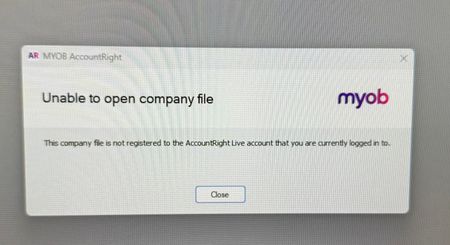
I have a client who invited a staff member to access the AR Desktop and the below error message keeps being received when she tries to accept the invitation and login: Another employee has the same settings and can login on the same computer so what is happening to prevent the employee access?50Views0likes3CommentsLong Service Leave Entitlement - no longer showing on payslip??
Hi - I have noticed that since 01/07/26 the Long Service Leave Entitlement is no longer showing up on payslips. It still has the show leave balance on payslips selected and the employee's that are applicable for Long Service Leave are all selected and have it definitely selected on their card. We haven't ammended our template????23Views0likes2Comments