Find answers, offer solutions, ask questions


Learn, solve, grow
Level up your skills and find answers across all MYOB products
Featured Places

MYOB Announcements
The latest news and happenings on the MYOB Community Forum.Featured Places

In Focus - Coming Soon
Learn how we test new features and how to get involved. Discover whats in progress, coming soon or recently closed for your preview into new features that might be coming to our software soon!Featured Places

Bank Feed Updates
MYOB will be using this board to provide updates about Bank Feeds. This includes when we are aware of any delays in feeds being sent to files.Incidents & Outages
Check for incidents & outages that may affect your software
Click here to view status page
Featured Content
Hi there,
The new Payday Super legislation will require employers to pay Superannuation Guarantee (SG) contributions at the same time as salary and wages from 1 July 2026. Contributions must re...
5.5KViews
5likes
60Comments
Featured Content
MYOB AccountRight version 2026.8 will be released on September 16th 2026.
AccountRight updates are typically made available around the middle of every month.
These updates include, new features,...
15KViews
1like
0Comments

Superannuation Fund does not exist in list
Hi, I have a client who has a new employee who has nominated a Superannuation Fund that is not included in the MYOB list of Superannuation Funds. The Client has confirmed the details of the Fund with the Fund. The onboarding form showed a different name but the correct ABN and correct USI, but the client gets an error when trying to pay this Fund. Error is "Fund No Longer Accepting Contributions"24Views0likes1Comment
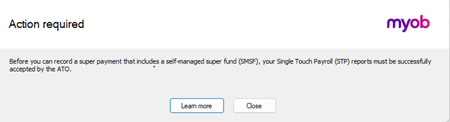
PayDay Super - SMSF
Why after the new update can I not automatically pay the super straight after wages? Message comes up as per below. This did not happen last week. This will cause people to be late with Payday super if they cannot do it straight away after the pay run. They will forget to go back and process.18Views0likes1CommentClient's supplier invoices being blocked into in-tray Case number 03333891
My client has a supplier who changed their email address to one that now includes donotreply at the beginning of the email. The purchases in-tray has stopped receiving invoices since this change and the solution provided by MYOB below still doesn't work. No error message is being received when the supplier send the invoice and they have the correct email address for the in-tray. Sending to you the copy of the steps we have followed to receive invoices automatically in the In-Tray. In AccountRight, go to Purchases → In Tray → Email address and copy the In-Tray address. 2. Open the customer’s email app: Outlook: select New Email Gmail: select Compose 3. In "To", paste the copied In-Tray address. 4. Select Attach file and attach only the supplier’s PDF invoice. 5. Remove any automatic signature, logo, images, CC/BCC recipients, or email body text. 6. Send the email. 7. Return to AccountRight and refresh Purchases → In Tray. Do not select Forward on the supplier’s original email. Download the PDF first, then attach it to a new email; supplier portal links or embedded content may not arrive as valid attachments Kindly make sure as well that the customer is sending the email invoices back to the correct email on the account. My client is wasting a lot of valuable time on this and needs to find a solution. Regards Liz
Incorrect Due Date Displayed on COD Supplier Bills
Hi, I've recently noticed what appears to be an issue with the due date being assigned to supplier bills. We received and uploaded a supplier invoice with: Invoice Date: 04/09/2026 Payment Terms/Due Date: C.O.D. However, after the bill was created in MYOB, the Bills List screen displayed a due date of 04/10/2026, effectively treating the invoice as being due 30 days from the invoice date. Because the bill appeared as not yet due, it remained unpaid. We only became aware of the issue when the supplier contacted us to follow up on payment. Could you please advise: Is this a known issue? Are there any settings within MYOB that could cause a COD invoice to be assigned a due date one month from the invoice date? Is there a way to ensure uploaded supplier invoices with COD terms default to the invoice date as the due date? I look forward to your advice. Thanks...Michelle
Our balance sheet doesn't balance!
I have belatedly found an error in our balance sheet report with the retained earnings figure in the new year after year end, differing from the total equity figure at year end. We report on a cash basis and year end is 30 Sept. 30 Sept'24 Total equity = $156,538.36 but at 1 Oct'24 Retained earnings = $157,448.36 These two numbers should be the same. I'm willing to admit I may have made an error -perhaps with year end processing (?), but could it be an MYOB system hiccup? Most important though - how to correct this imbalance now as it has continued on into current year accounts? Please see attached for a little more detail. Thanks in anticipation28Views0likes6CommentsLogin Dropping Out multiple times a day
Forgive the wrong discussion board for this, but there is nowhere to post regarding general system issues. For weeks now multiple users are having issues with MYOB dropping out. Yesterday for example, a colleague lost connection 10 times during the day - alot of the time while she was in the middle of creating an invoice, so has lost that information and needed to return to where she was when she logged back in. Today, she is at 5 drop outs, and i am at 3. There are 4 of us logged in to our file via the desktop application (using the browser version does not interest us as the user experience is not great when we are putting through thousands of transactions a month). Our IT providers have looked to see if there is anything in our network that is blocking our access, but they have said everything is fine on their end. We have cleared all caches, cookies, history, emptied recycle bins - nothing has changed. We are at our wits end. HELP PLEASE!21Views0likes1Comment
Employee Expense Reimbursement
Hi community members, Does anyone know of an MYOB add-on or integrated app that helps streamline the expense reimbursement process? Many of our staff pay out-of-pocket while traveling. Our current credit card system is already time-consuming, so we prefer not to issue additional cards. We are looking for a solution that allows staff to scan receipts and process claims directly into MYOB, or any tool that makes manual receipt reconciliation more efficient. Any recommendations would be greatly appreciated. Thank you, Gav34Views0likes3CommentsPossible Solution to avoiding Verification Process
This suggestion has probably been suggested by others, so it's not an original idea...but, here goes! The solution around avoiding the verification process is to simply print the invoice as a pdf and attach it to an email. Ironically, almost all clients/customers prefer this anyway as they do not, unfairly I might add, invoices sent from within MYOB anyway. So there you have it. PDF the invoices and email them as attachments which identifies the sender with email signatures and the added bonus of attaching supporting documentation to the invoice such as their PO and/or timesheets, etc and CC the email to various email addresses if needed.Receive Payment in Different Currency via Import/Export Wizard
AccountRight Premier AU 2026.7.0, build 2026.7.1.21. Multi-currency is enabled. NZD exists in Currency List. Customer has default currency NZD and the invoice is an NZD invoice. Receive Payments imports successfully when Currency Code is omitted, but defaults the payment to AUD. When Currency Code = NZD is included, the import fails with: "SetProperty: Invalid Property Name: CurrencyId for type: MYOB.Huxley.API.Entities.IReceivePaymentEvent." MYOB’s current Receive Payments import specification lists Currency Code as a supported Premier field. Has anyone been able to get this to work. I've tried every possible combination I believe.
Emailing and Link Trouble
Hi, I am having trouble with Invoices, Orders and now Quotes Not emailing from MYOB. I check the sent emails section and they have not gone. Can it be a Form Format issue, not linking when updates get sent to us? Also when Invoices are sending I am being informed the client receiving is not able to open the Invoice Link to acquire there invoice, and I am being asked to send a PDF by email. Any ideas or Help would be muchly appreciated as usual. Thank you again. Kermie39Views0likes2CommentsUnable to Match Existing Transactions on Bank Feed
I have two transactions on my bank feed (transfer between accounts) that have not been auto matched by MYOB and the matching transaction does not show when I try to manually match to existing record or use the find option. The date and amounts are the same.28Views0likes1Comment
Timesheet entry
Hi, I am trying to use timesheets as there are multiple jobs. I have entered the timesheet corrrectly, it has opened in the payrun, veiwing it is correct, however when it continues to the calculation section it is grossly changing the base hourly? I am not sure where this comes from. Time sheet has 80 hours base hourly, 7.87 Time & Half, 8.75 double time. The overtime is flowing correctly, but the base hourly is 144 hours > 64 hours too much?27Views0likes1CommentHow to post on the Community Forum
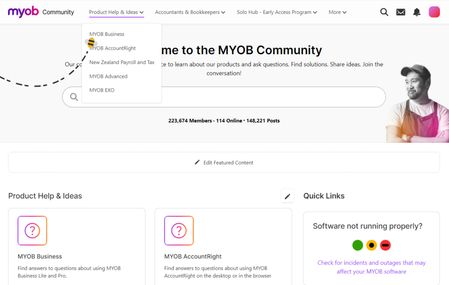
Hey everyone! Happy Friday. Sharing a quick guide on posting on our Community Forum to help you get the best response! To make a post, you'll want to navigate directly to the board that relates to your question. If it's regarding one of our products, you'll be able to click onto Product Help & Ideas from the home page and select the relevant product. From there, select the board your question relates to: and you'll be able to select Ask a Question on the top right! When posting a question, include these points of information so others can understand what you're unsure of and respond accordingly. What are you trying to do in the product? Where are you getting stuck? Are there any error messages coming up? Include relevant screenshots. Feel free to reach out if you have any further questions! Hope everyone has a great weekend. Cheers, Amanda.2.9KViews4likes31Comments
Uploading Supplier Invoice Failure
I am unable to upload my largest suppliers invoices. Data is not automatically filling I have to manually enter all data. Invoices are in my in tray but has blue settings spinning icon as below. All other suppliers invoices are uploading in full with all data filled in. I have completed shut downs & rebooted.Automatic scheduled reports
I had an idea that it would be good if I could get a report emailed to me once a week with a list of outstanding invoices. I tried asking Ai how to do this and the answer involved getting a MYOB developer account (which seems to be at least $110pm). This cost is certainly not worth it. I was wondering if anyone knows if there is a way to schedule reports like this? Thanks in advance.RECONCILING BANK REGISTER
Good morning, everyone. When I took over our small business 9 years ago the previous owner advised me NOT TO hit record after applying deposits & withdrawals, so I haven't been. Can somebody explain to me why not, because if I don't "Record" this can potentially mean that if I "Reconcile Account" (under banking command centre) it may not balance then I will need to try and find my mistake. My accountant only noticed this reconciliation problem when she was doing my 25/26 EOFY tax. Also, I don't understand why my "Reconcile" accounts wouldn't balance. I apply deposits/withdrawals a few times a week and the Banking Register ALWAYS balances to my actual bank statement (from bank). I am confused. Have a good week, Sharon NAIL EQUIP P/L26Views0likes1Comment